How long does App Store review take, and what do reviewers check?

You’ve built your mobile app, tested it on your phone and submitted it. Now it sits in a queue. Apple reviews most App Store submissions within 48 hours, Google Play can take up to seven days, and a rejection starts the wait over.
Knowing what happens during the wait, and what reviewers look for, makes your launch date easier to plan and a rejection less likely. If you build with Thunkable, its Store Listing checklist flags many of the stores’ requirements before you ever hit submit.
What app review is and why the stores require it
App review is the check Apple and Google run on every new app and update before it can go live in the App Store and Google Play. Reviewers confirm the app works, matches its store listing and follows each store’s rules on privacy, content and safety.
Apple reviews every app, app update and in-app purchase submitted through App Store Connect, the website where developers manage their App Store listings and submissions. Google reviews apps submitted through the Google Play Console, its equivalent dashboard, against its developer policies.
The volume is large. Apple says its App Review team evaluated more than 9.1 million submissions in 2025 and rejected more than 2 million of them for not following its guidelines, including more than 1.2 million new apps, according to its May 2026 App Store fraud report. Apple’s report also credits AI development tools with driving a surge in submissions. Your app joins that line.
How long does App Store and Google Play review take?
Both stores publish estimates. Neither guarantees a date.
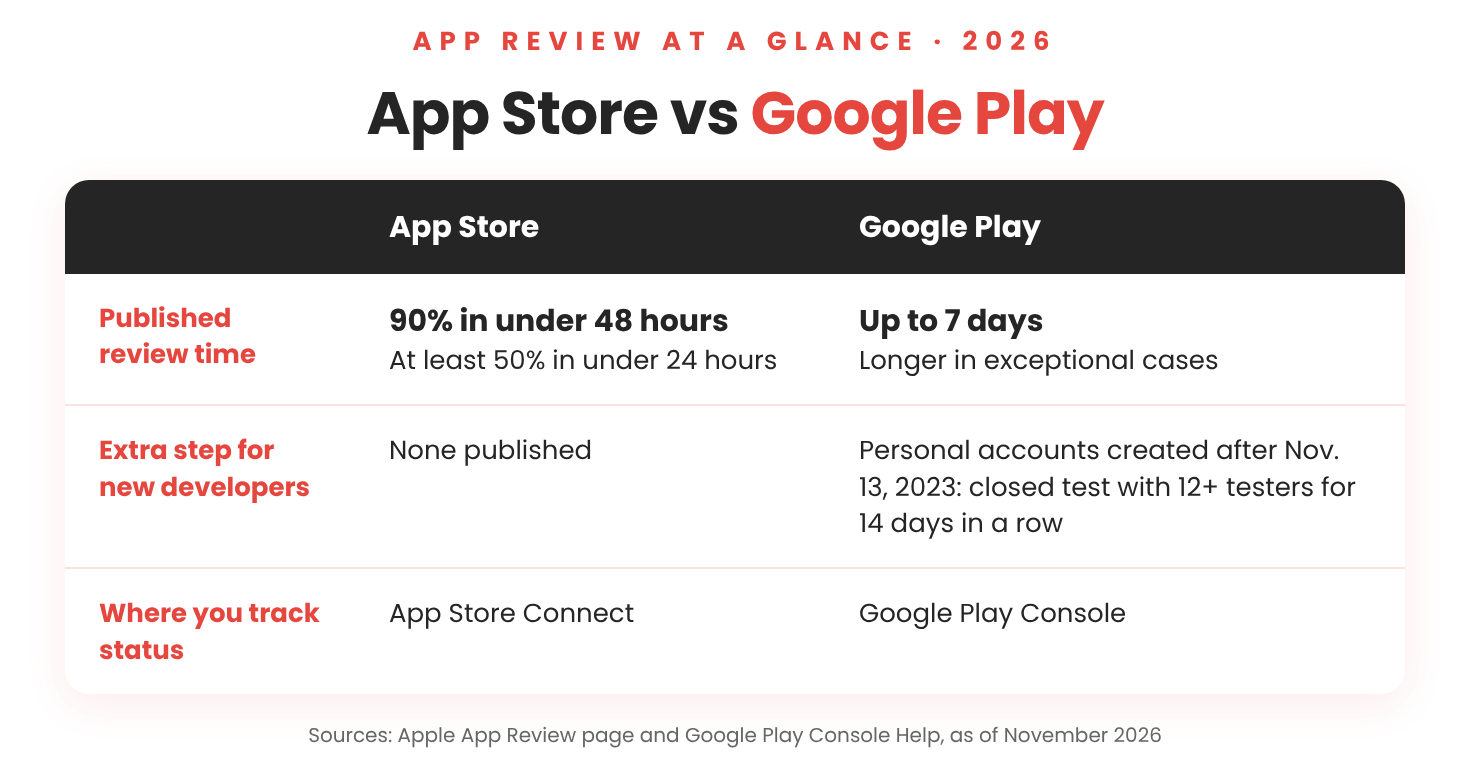
its App Review page, and Google’s come from its Play Console Help Center. Older articles often quote Apple reviewing 90% of submissions in under 24 hours, so check Apple’s page for the current estimate before you set a launch date. These figures were current as of November 2026.
For a new Android developer with a personal account, the Google Play testing requirement is often the longest part of the timeline. A closed test is a release shared only with testers you invite. Your 12 testers must stay opted in for 14 straight days before you can apply for production access, Google’s permission to release the app to the public. Then the app goes through review. Accounts registered to an organization follow a different path.
Why is my app still waiting for review?
The wait happens in a queue
Apple and Google each control their own review queues and timelines. A status such as Waiting for Review in App Store Connect means your app is in line and no one has opened it yet. How long it stays there depends on how many submissions are ahead of yours.
Uploading an app and submitting it are separate steps
A finished upload does not always mean the app is in review. Apple and Google may still need information, such as an age rating or a privacy questionnaire, before the submission goes through. Until those items are complete, your build waits, and the review clock hasn’t started. Thunkable’s Store Listing documentation walks through this difference.
Missing information adds a round
Apple says incomplete submissions can delay review or fail it. After a rejection, you fix the issue, resubmit and wait for another full review, so one missing item adds a whole review cycle.
Some apps need more scrutiny
Apps in highly regulated fields, such as banking, health care, gambling, cryptocurrency and air travel, must be submitted by the legal entity that provides the service, often with supporting documents. Apps for kids with third-party ads, apps that work with medical hardware and apps that stream licensed content also need extra paperwork. Google notes that certain apps may get extended reviews.
What’s changed for 2026
Both stores tightened their requirements this year. Missing one of these can block an upload or a submission before review even starts.
Apple’s updated age ratings
Apple’s age rating system now includes 13+, 16+ and 18+ alongside 4+ and 9+. Every app needed answers to the updated age rating questions by January 31, 2026, to avoid interruptions when submitting updates.
Starting November 16, 2026, the questionnaire also asks whether your app includes two new content descriptors: Shared Location, meaning sharing real-world location with another person or group, and Dating and Relationships. You must answer them when you submit an update or change your age rating answers, and every app needs them completed by January 12, 2027. Apps with Dating and Relationships features get a minimum 18+ rating.
New build requirements
Since April 28, 2026, apps uploaded to App Store Connect must be built with Xcode 26 or later using the iOS 26 SDK. On Google Play, new apps and app updates must target Android 16 (API level 36) or higher since August 31, 2026.
Stricter rules for copycat and low-effort apps
In June 2026, Apple added a line to its spam guideline, 4.3(b), telling developers not to submit apps that are indistinguishable from what’s already widely available. Common categories such as flashlight, wallpaper, simple timer and fortune-telling apps are rejected unless they offer a meaningfully different experience.
In October 2026, Apple added guideline 2.5.19 against bait-and-switch apps, which hide what they do during review and reveal it after approval. It reinforces an existing rule: the app you submit must be the app users get. Features added after approval go through review in an update.
What Apple’s reviewers check
Apple publishes its full App Review Guidelines along with a list of the issues it sees most often. On average, more than 40% of unresolved issues relate to guideline 2.1, App Completeness, which covers the first two checks below.
Does the app work from start to finish?
Reviewers look for crashes, bugs, broken links and placeholder content, such as sample text or stand-in images. Apple asks developers to test on devices running the latest software before submitting. Any backend services your app relies on, such as a database or sign-in service, must be live and reachable during review. Every app also needs a working support link with current contact information and a link to its privacy policy.
Can the reviewer get into the app?
If your app requires sign-in, include a working demo account in the App Review Information section of App Store Connect. Add any special settings or instructions a reviewer needs, and explain any features that aren’t obvious. Keep your contact information current. A reviewer who can’t get past the sign-in screen can’t approve the app.
Does the privacy policy match what the app does?
Under guideline 5.1, your privacy policy must state what data the app collects, how it collects that data and every way it uses it. It also needs to explain how long you keep data, how users can request deletion and how any third parties that receive the data protect it. When your app asks for access to the camera, location or other personal data, the permission message, the short explanation users see in that pop-up, must clearly say why the app needs it.
Do the screenshots and description match the app?
Under guideline 2.3, screenshots should show the app in use. The app must do what its listing promises, and an app that appears to offer features it doesn’t deliver will not pass.
Does the app offer enough to do?
Under guideline 4.2, Apple looks for apps that are useful and make good use of what an iPhone can do. A website displayed inside an app, a collection of links or an app with very little content may not pass. Apple also turns away near-duplicate apps from one developer and apps that copy other apps.
What Google Play checks
Google reviews apps against its Developer Program Policies, and its listing requirements differ from Apple’s. Finishing your App Store listing does not mean your Google Play listing is ready.
The Data safety form
The Data safety form is Google’s required declaration of what user data your app collects and shares and how it handles that data. The answers appear on your store listing, so they must match what the app does.
The content rating questionnaire
This questionnaire, run through the International Age Rating Coalition, asks about your app’s content and assigns the age rating shown on your listing.
Store listing assets
Google Play requires an app icon, a title, short and full descriptions, screenshots, a privacy policy link and a feature graphic, a 1024 x 500 pixel banner image shown at the top of your listing.
How to respond to a rejection
If Apple rejects your app, App Store Connect shows which guideline the submission didn’t follow. You can reply to App Review there to resolve the issue before resubmitting. If you believe the reviewer misunderstood your app, you can file one appeal per rejected submission with the App Review Board. Apple also offers 30-minute video appointments with App Review to talk through its guidelines before you submit.
How to get an expedited App Store review
For a critical bug fix or a launch tied to an event, you can request an expedited review from Apple. Include steps to reproduce the bug, or the event name, date and your connection to it.
You can only ask once the app is submitted, and Apple reserves expedited reviews for genuine urgency, so don’t build a launch plan around one. For a dated launch, schedule the release in App Store Connect ahead of time instead.
How Thunkable helps you submit a complete app
Thunkable is an AI-powered mobile app builder that takes you from idea to a published iOS and Android app, including the last step into the stores.
Thunkable’s Store Listing checklist shows what’s ready and what still needs attention for the App Store and Google Play, each on its own tab. Complete items show a green check, and items you still need to finish show in red.
Thunkable checks many of the items covered above for you, including reviewer sign-in details, iOS permission messages, screenshots and the privacy policy link. For the items only you can complete, such as Apple’s age rating or Google’s content rating questionnaire, the checklist tells you which ones remain and whether to finish them in App Store Connect or the Google Play Console.
“I loved how simple Thunkable made the App Store submission process.” Guy Bacci, Founder, Pennant Chase
Thunkable AI can draft your store description and keywords, generate an app icon or feature graphic and draft your Data safety answers from what your app does. Nothing goes to Google until you review and confirm those answers. Each of these uses AI tokens, the credits included with your plan. You can also use a privacy policy hosted through Thunkable or link your own.
After you publish, you can follow the process in the Thunkable chat, and you’ll get an email when your iOS build is done. A build that reaches the store isn’t always submitted for review yet, so check App Store Connect or the Google Play Console for anything still marked as missing.
Before any of that, Live Test lets you run the app on your own iPhone or Android phone through the Thunkable Live app to catch bugs before a reviewer does.
For step-by-step instructions, see Thunkable’s guides to iOS publishing, the App Store review process and the Google Play review process.
A complete submission is the fastest one
You can’t control Apple’s or Google’s queue. The part you control is whether your first submission is the only one you need to make.
Check your listing before Apple or Google does. Start building free on Thunkable, and when your app is ready, open the Store Listing checklist to see what the App Store and Google Play still need.

View Pricing
If you’re an administrator or requesting multiple licenses for your school or district, our team will follow up with you directly to learn more and help set up the right Education plan. We’ll work with you to make sure Thunkable is the best fit for your districts/classrooms.
We also offer special discounts for individual students and educators. Apply below, and you’ll receive a promo code via email to claim your discounted Thunkable Education plan.


Related Resources
How long does App Store review take, and what do reviewers check?
How to build a custom business management app without code

How to build an e-commerce or marketplace app without code
Start
Creating
Creating


Your idea can be live today.