How to build an e-commerce or marketplace app without code

Every great local business starts with someone who sees a better way to connect people with what they need: a baker who wants regulars to preorder Saturday bread, a neighbor who knows half the street can fix bikes or mend clothes, or a deal hunter tired of opening ten tabs. An e-commerce or marketplace app gives you a direct line to buyers, sellers and repeat customers, without paying someone else's commissions or playing by their rules. And you can build one without code.
Building a marketplace or store app without code starts with who it serves and what they need to find, buy or sell. In Thunkable, the AI turns that description into screens and logic. You add login, search and payments, then publish a native app to the App Store and Google Play. This guide walks through the three most common commerce apps, the features each one needs, example apps built with Thunkable, and how to get started.
In this guide:
- Two-sided marketplaces
- Single-business storefront and ordering apps
- Price comparison and deal finding apps
- Feature checklist and FAQ
What makes a good commerce app?
Every successful commerce app answers one question fast: can I find what I want and trust the person selling it? That comes down to three building blocks.
- Accounts: Buyers and sellers sign in so orders, messages and history follow them across devices.
- Discovery: Search, filters and maps help people find the right item or shop in a few taps.
- Trust: Profiles, ratings, messaging and clear checkout reduce the friction that makes people leave.
How do you build a two-sided marketplace app?
A two-sided marketplace app connects people who have something to offer (supply) with people who want it (demand), in a specific niche or region. Think farm-to-buyer produce, local makers, barter and trade, or gig and service work.
Picture this: The potter down the street, the family with an overflowing herb garden and the person who mends jeans are all one tap away. Your app becomes the neighborhood market that's open every day.
Who builds these: Founders launching a new venture who see an underserved local market or community.
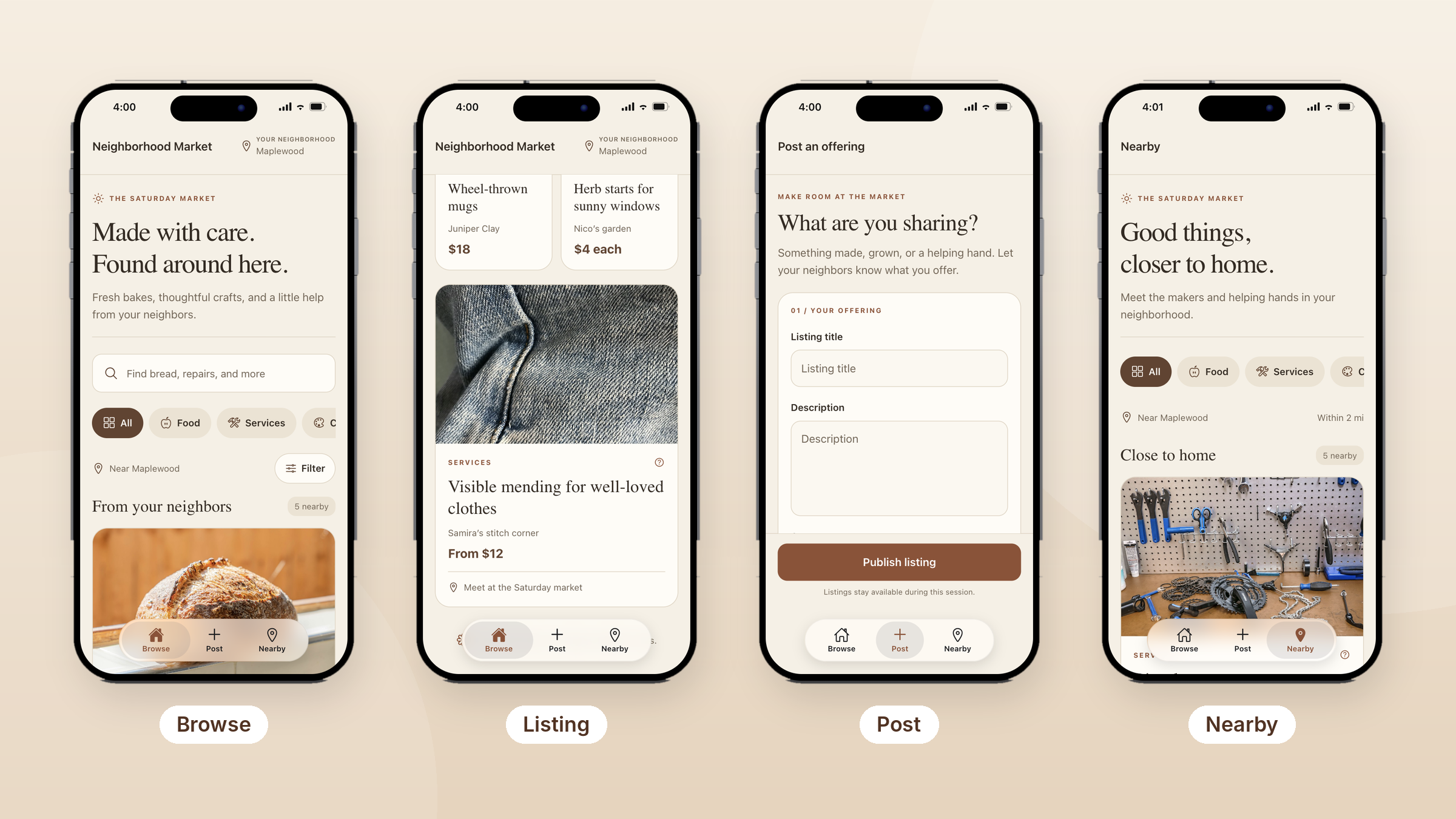
Inside an example app: Neighborhood Market, built with Thunkable, is a local marketplace where neighbors sell what they make, grow or fix.
- Browse: A feed of listings from your neighborhood, with a search bar (“Find bread, repairs, and more”), category chips for food, services and crafts, and a filter. Listings range from wheel-thrown mugs to herb starts to visible mending, each showing the seller, price and where to meet.
- Post: A simple form where anyone can list an offering with a title and description, then publish it to the market.
- Nearby: The same listings narrowed to sellers within a couple of miles.
Must-have features:
- Login and user accounts so buyers and sellers each have a profile and history
- Roles that give buyers, sellers and admins different screens and permissions
- Cloud sync so new listings appear for everyone in real time
- Search and category filters so buyers find the right item or service fast
- GPS and maps to show nearby sellers and meeting spots
Ways to extend it: add in-app chat and messaging so buyers can ask questions and arrange pickup without leaving the app, plus ratings to build trust between neighbors.
Tip: Marketplaces live or die on early supply. Launch in one neighborhood, like this example's focus on Maplewood, recruit your first sellers by hand, and invite buyers once listings feel full.
How do you build a shopping app for your own store?
A single-business storefront app gives an existing shop or brand its own direct sales channel, so customers buy from you instead of through a third-party platform that takes a commission.
Picture this: Your regulars open your app instead of a third-party platform, save their favorites and come back next week. Every sale is yours, and so is the relationship.
Who builds these: Boutiques, home goods and gift shops, makers, cafes and local retailers who already have customers and want to keep more of each sale.
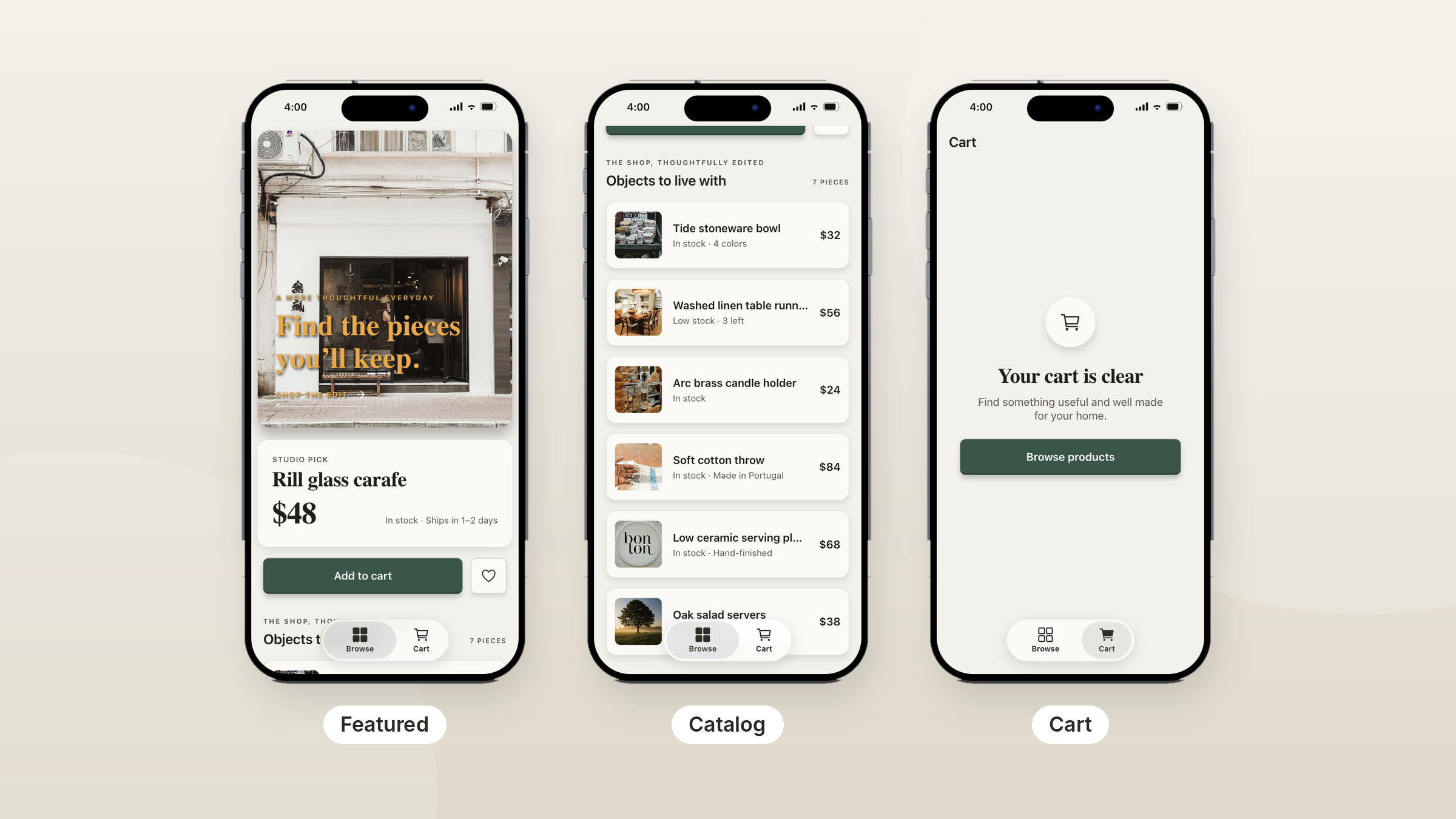
Inside an example app: This home goods storefront, built with Thunkable, keeps shopping to two tabs.
- Browse: A featured “studio pick” up top with price, stock status and shipping time, plus Add to cart and save buttons. Below it, the full catalog of products, each with a photo, price and a short stock note like “Low stock, 3 left” or “4 colors.”
- Cart: Everything the customer has added, with a friendly empty state that sends them back to browse.
Must-have features:
- Product catalog with search and filter so customers find a product by name, category or price
- Cart and checkout connected to a payment provider through API integrations
- Login to save addresses, past orders and favorites for faster reordering
- Cloud sync so stock levels stay accurate as items sell
Ways to extend it: add a map and store locator for in-store pickup, push notifications for restocks and new arrivals, or API integrations with your existing inventory system.
Tip: Show stock honestly. Small notes like “3 left” or “Ships in 1 to 2 days,” as this example uses, answer the questions that stop people from buying. Give customers a reason to install, too, like app-only items or a loyalty reward.
How do you build a price comparison app?
A price comparison app gathers prices from several retailers into one place so shoppers can spot the cheapest option without opening a dozen tabs.
Picture this: The friend who always knows where to find the best price turns that habit into an app their whole community checks before every big purchase.
Who builds these: Deal hunters, niche hobbyists and entrepreneurs who know a category well, such as electronics, groceries, sneakers or fuel.
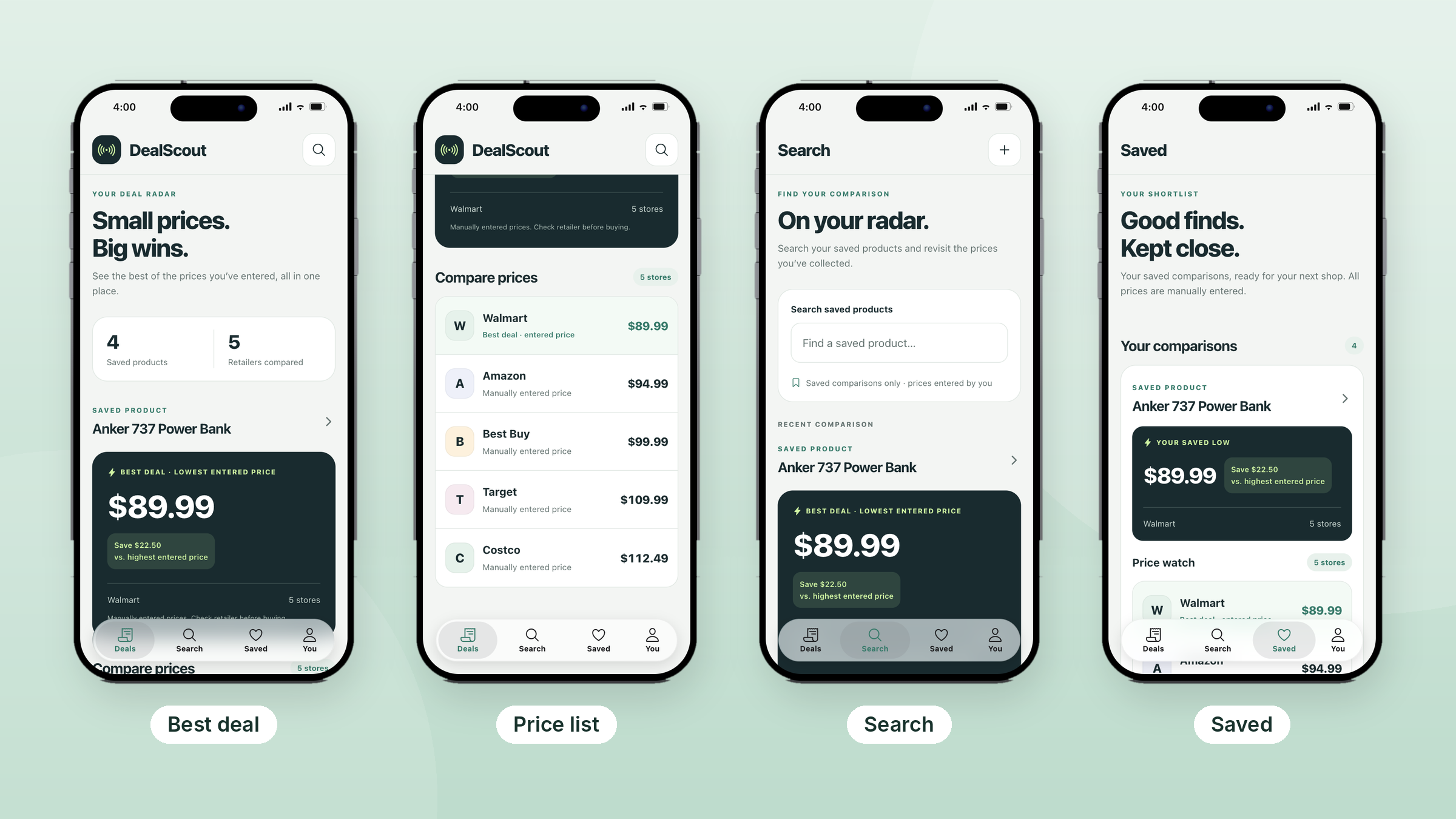
Inside an example app: DealScout, built with Thunkable, starts simple: shoppers enter the prices they find, and the app ranks them.
- Deals: A dashboard of saved products and retailers compared, with the best deal for each product front and center and how much it saves versus the highest price. Below it, every retailer's price, ranked lowest to highest.
- Search: Find any saved product and revisit the prices collected for it, or add a new one.
- Saved: A shortlist of comparisons ready for the next shopping trip, each showing its saved low and a price watch list.
- You: How the app works, including which retailers are tracked and that prices are ranked before tax and delivery.
Must-have features:
- Search and filter to narrow results by product, store or price
- Cloud sync so saved comparisons follow the shopper to any device
- Clear sorting and savings math that makes the best option obvious at a glance
Ways to extend it: add API integrations to pull live prices from retailer or affiliate feeds instead of entering them by hand, charts to show price history, and push notifications for price-drop alerts.
Tip: Start manual, then automate. Hand-entered prices, as in this example, let you test whether people want the app before you build data feeds. Be upfront about where prices come from: DealScout tells shoppers prices are entered by hand and to check the retailer before buying.
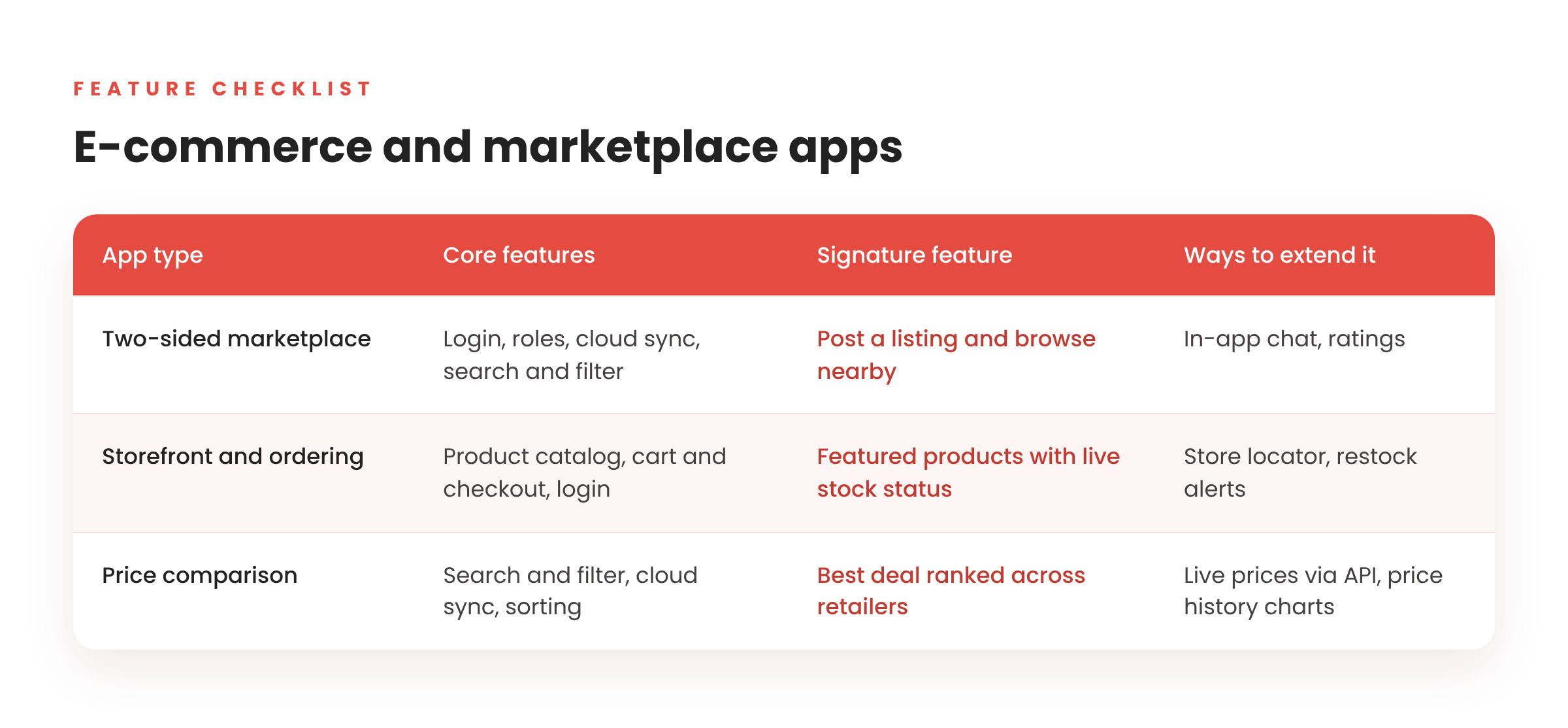
Which features does each commerce app need?
Why build your commerce app with Thunkable?
Thunkable is the AI-powered mobile app builder for apps your customers download and come back to. Founded in 2015 by researchers with roots at MIT and Google, Thunkable has more than 6 million users in 194 countries, from solo founders to teams inside Fortune 100 companies.
- AI builds it with you, and you stay in control. Start with a prompt and get working screens and logic. Plan changes in Discuss Mode, and when the AI gets close, finish it yourself in the visual editor or edit code directly. Version History lets you roll back anytime.
- Truly native, not a website in a wrapper. Thunkable builds native iOS and Android apps with 25+ device features, including camera, barcode scanning, GPS and maps, push notifications and biometrics.
- Ready to sell. In-app purchases, subscriptions and ads are built in. Add email, Google or Apple sign-in for customer accounts, and connect a free Supabase account for a cloud database of products, listings and orders.
- Your brand, front and center. Publish white-label apps with no Thunkable branding on the Builder and Advanced plans.
- A clear path to the stores. Publish to the App Store, Google Play and the web in a few clicks, with publishing guides and AI checklists along the way.
- More than a decade of mobile expertise. Thunkable has focused on mobile app building for 10+ years, and that experience shapes how the AI builds.
How to get started in 4 steps
- Describe your app. Tell the AI builder who it's for and what it does, for example “a marketplace where local farmers list produce for pickup.”
- Review the generated screens. Use Discuss Mode to plan features and adjust layout and logic, or take direct control in the visual editor.
- Add your data and features. Add email, Google or Apple sign-in, connect a free Supabase account for your cloud database, connect APIs, and add native features like maps and push notifications.
- Test and publish. Preview on your phone, then publish native apps to the App Store and Google Play.
Frequently asked questions
Can I build a marketplace app without coding?
Yes. Thunkable's AI generates screens and logic from a description, and you can add sign-in and connect a free Supabase account for a cloud database. No coding is required to get started.
What's the difference between a native app and a web app in a wrapper?
A native app is built for iOS and Android, so it can use device features like the camera, barcode scanning and push notifications directly. A wrapped app is a website inside an app shell, which can feel slower and may lose access to some device features. Thunkable builds native apps, so your store feels like it belongs on your customers' phones.
What features does a marketplace app need?
At minimum: user login, separate buyer and seller roles, real-time cloud sync and in-app messaging. Location-based marketplaces also need GPS and maps.
Is a marketplace or a single-store app easier to launch?
A single-store app is usually easier, because you already have products and customers. A marketplace has to attract both buyers and sellers at the same time.
Can I take payments in my app?
Yes. For digital goods, subscriptions and premium content, Thunkable's in-app purchase blocks connect to RevenueCat and work in iOS and Android apps. For physical products, like orders from your store or marketplace, connect a payment provider such as Stripe through Thunkable's Web API blocks. Apple and Google require their own in-app purchase systems for digital content, so choose the option that matches what you sell.
Will my app be on the App Store and Google Play?
Yes. Thunkable builds native iOS and Android apps you can publish to both stores. Store publishing is included on the Builder and Advanced plans.
Start building your commerce app
The best commerce ideas usually come from noticing what's missing where you live or shop. If you can picture your buyers, your sellers and your first few listings, you already have a starting point.
Your first step this week:
- Name the community or customers your app serves.
- Sketch the three screens they'd use most, like browse, post and cart.
- Describe it to the AI builder and see your first version take shape.
Whether you're connecting a community of buyers and sellers or giving your shop its own channel, you can go from idea to a published app in one place.

View Pricing
If you’re an administrator or requesting multiple licenses for your school or district, our team will follow up with you directly to learn more and help set up the right Education plan. We’ll work with you to make sure Thunkable is the best fit for your districts/classrooms.
We also offer special discounts for individual students and educators. Apply below, and you’ll receive a promo code via email to claim your discounted Thunkable Education plan.


Related Resources
How to build a custom business management app without code
How to build an e-commerce or marketplace app without code
How to build a healthcare or wellness app without code
Start
Creating
Creating


Your idea can be live today.