How to build a healthcare or wellness app without code
Some of the most meaningful health apps don't start in a hospital or a big tech company. They start with a parent who wants their child to be heard, a patient tired of forgetting what to tell their doctor, or a counselor who sees students struggling with nowhere to turn. If you know a health challenge up close, you already have the most important ingredient for a great healthcare or wellness app: you know what's missing.
Building a health or wellness app without code starts with who it helps and the one thing it should make easier. In Thunkable, the AI turns that description into screens and logic. You add features like reminders, charts, Bluetooth device connections or text-to-speech, then publish a native app to the App Store and Google Play. This guide covers the four most common healthcare and wellness apps, the features each one needs, example apps built with Thunkable, and how to start.
In this guide:
- Mental health and emotional wellness
- Medication, symptoms and condition monitoring
- Accessibility and assistive communication
- Care services and clinical tools
- Feature checklist and FAQ
What makes a good health app?
People trust health apps with personal information and come back to them daily, so the basics matter.
- Privacy: Secure login and clear control over who sees what.
- Habit: Reminders and progress tracking that make daily use easy.
- Access: Large text, high contrast and voice support so everyone can use it.
How do you build a mental health or wellness app?
A mental wellness app gives people a private, always-available place to check in with themselves, process emotions and build calming daily habits.
Picture this: A high school counselor notices students only reach out once things feel overwhelming. She builds a calm check-in app students can open between classes, a small daily habit that makes asking for help feel normal.
Who builds these: Founders with a personal mission, community advocates filling a local gap, and students or counselors supporting their schools.
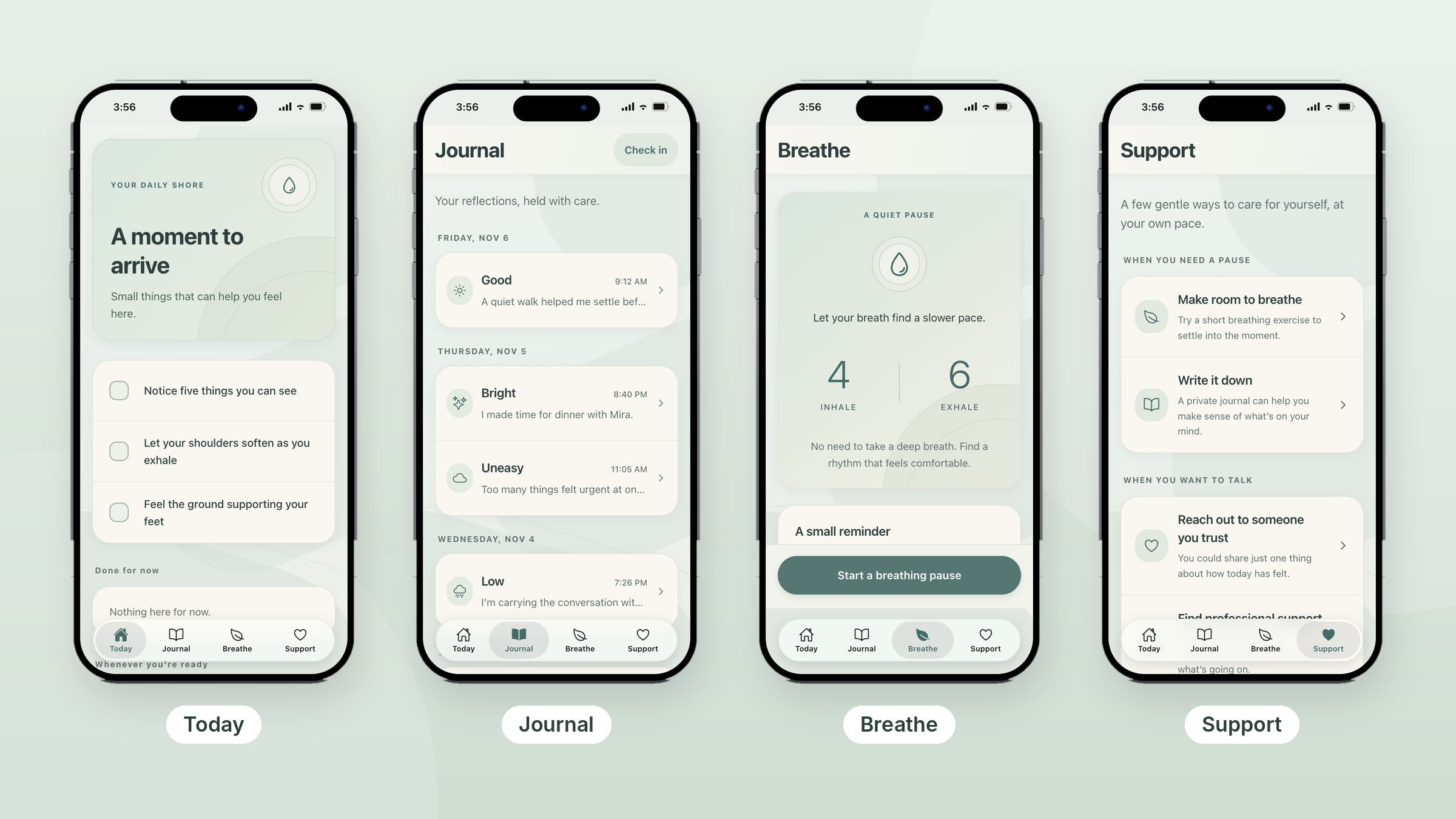
Inside an example app: This wellness app, built with Thunkable, is organized around four simple tabs.
- Today: A short grounding exercise with three gentle prompts people tick off, like noticing five things they can see or feeling the ground under their feet.
- Journal: Quick mood check-ins (Good, Bright, Uneasy, Low), each with a short reflection, grouped by day.
- Breathe: A paced breathing exercise, 4 counts in and 6 counts out, with a one-tap start.
- Support: Self-care options for when you need a pause, plus ways to reach someone you trust or find professional support.
Must-have features:
- Login to keep each person's journal and check-ins private
- Cloud sync so entries are there on any device
- Reminders that prompt a daily check-in or a breathing pause
- Support resources that are always one tap away
Ways to extend it: add guided reflection prompts, or streaks and gamification that reward people for showing up each day.
Tip: Tone is a feature. Notice how the example uses gentle language like “Whenever you're ready” and “Done for now” instead of scores or pressure. Keep a clear path to professional help and crisis resources, because wellness apps support people but don't replace care.
How do you build a symptom or medication tracking app?
A symptom and condition monitoring app creates one reliable record, so nothing gets forgotten and doctors can see exactly what happened between visits.
Picture this: Someone living with migraines walks into an appointment with two weeks of clear notes instead of a fuzzy memory. Their doctor spots the pattern right away, and the conversation shifts from “what happened?” to “what's next?”
Who builds these: Patients managing a chronic condition, caregivers coordinating a loved one's care, and clinicians who want better information from their patients.
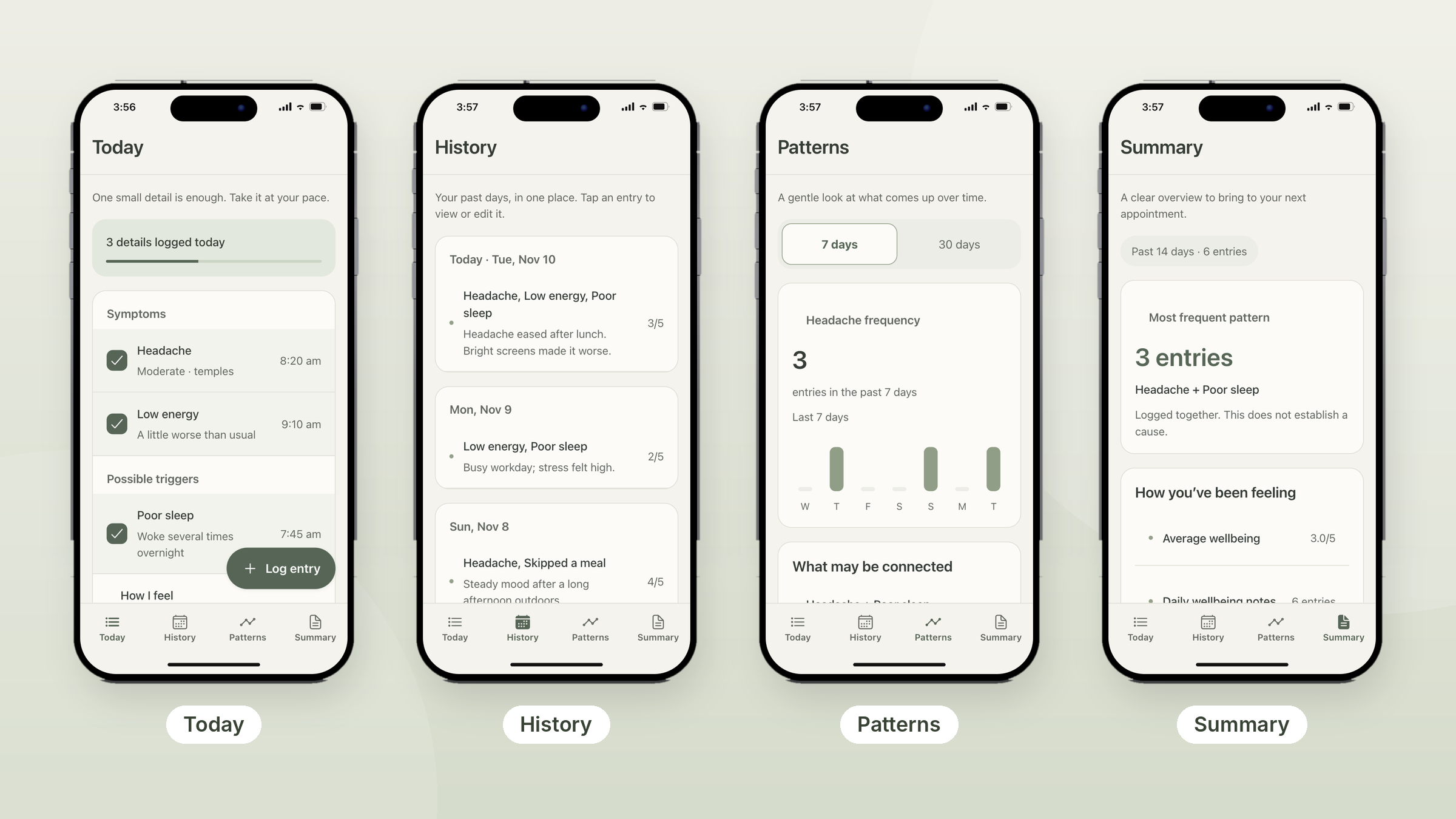
Inside an example app: This symptom tracker, built with Thunkable, turns quick daily logs into a summary someone can bring to an appointment.
- Today: Log symptoms (like a moderate headache at the temples) and possible triggers (like poor sleep), each with a time and a short note. A progress bar shows how many details are logged today.
- History: Each past day in one place, with the symptoms logged, a note and a 1 to 5 wellbeing score. Tap any entry to view or edit it.
- Patterns: A 7-day or 30-day chart of how often a symptom shows up, plus a list of things that were logged together.
- Summary: A 14-day overview for the next appointment, including the most frequent pattern and average wellbeing.
Must-have features:
- Login to keep health records private and tied to one person
- Cloud sync so a caregiver and patient see the same log on different phones
- Push notifications to remind people to log, or to take a dose
- Charts that show trends a doctor can review at a glance
Ways to extend it: add a medication schedule with dose reminders, Bluetooth device connections to pull readings from glucose meters, blood pressure cuffs or wearables, or a PDF export of the summary to send ahead of a visit.
Tip: Present patterns honestly. The example labels its most frequent pattern as “logged together” and states that this does not establish a cause. That small line builds trust and keeps the app from sounding like a diagnosis.
How do you build an accessibility or AAC app?
An accessibility app gives people the support they need to communicate and read with confidence, from augmentative and alternative communication (AAC) boards to sign language practice and easier-to-read text.
Picture this: A parent builds a communication board with their child's favorite foods, family photos and the exact words they use at home. A generic tool becomes their child's own voice.
Who builds these: Parents, speech therapists, special education teachers, and people building tools for their own community.
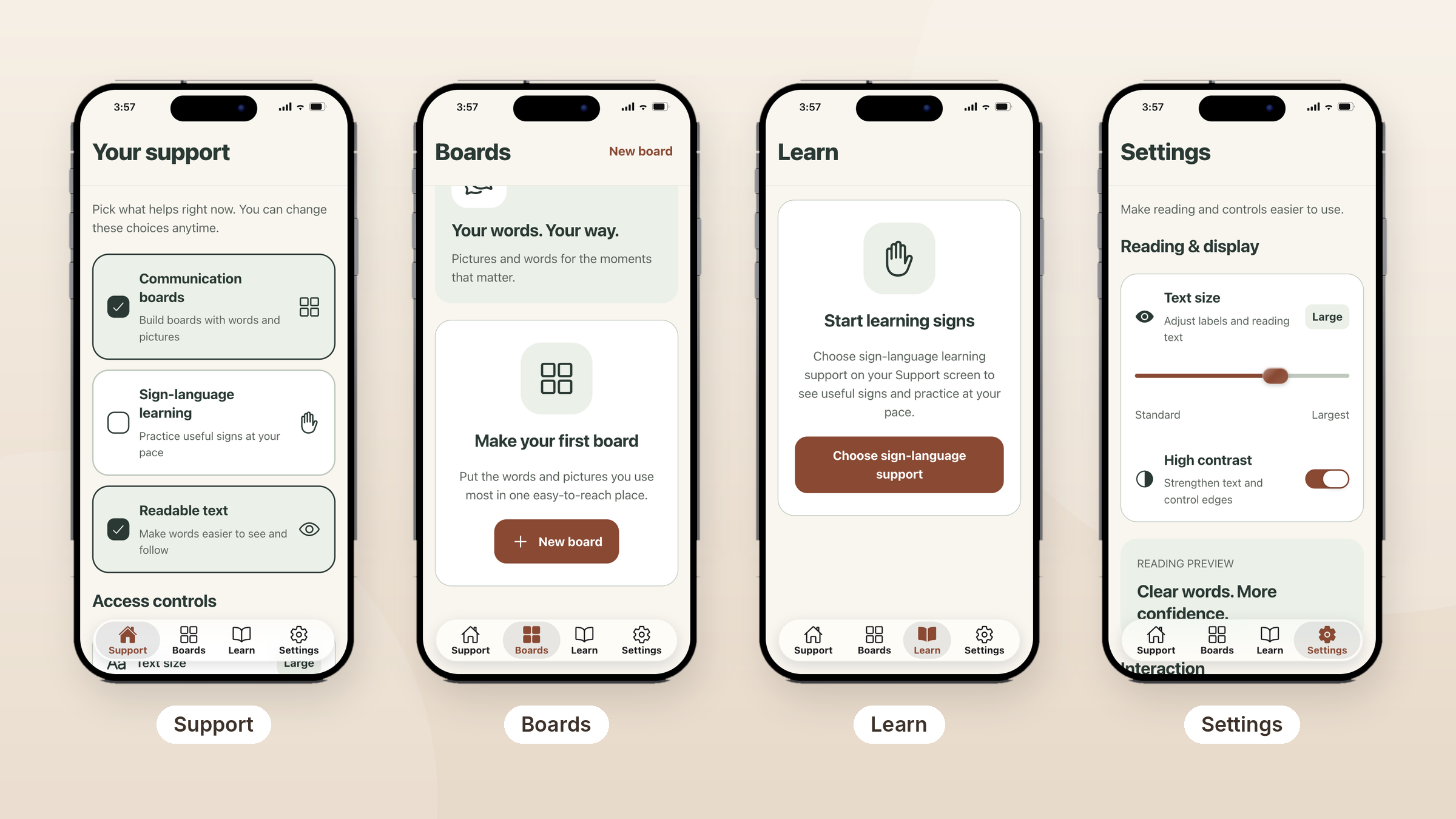
Inside an example app: This accessibility app, built with Thunkable, lets each person choose the support they need and change it anytime.
- Support: Pick from communication boards, sign language learning and readable text. Only the supports someone turns on appear in the app.
- Boards: Build custom boards of words and pictures for the moments that matter, starting with a single “New board” button.
- Learn: Practice useful signs at your own pace.
- Settings: A text size slider from standard to largest, a high-contrast toggle that strengthens text and control edges, and a live reading preview.
Must-have features:
- High-contrast mode and adjustable text size so the app works for low-vision users
- Large, clearly labeled buttons that are easy to tap
- Login and cloud sync so a person's boards and settings follow them to any device
Ways to extend it: add text-to-speech so each board button speaks its word aloud, or use the camera to read printed text or labels.
Tip: Let people opt in to what they need, as this example does on its first screen. A personal vocabulary and settings that stick are what make a custom AAC app more useful than a generic one, so test with the people who will use it every day.
How do you build an app for a clinic or care service?
A care services app helps patients find and connect with clinics, nurses and specialists, or gives providers one place to manage their patients and visits.
Picture this: A small home care agency replaces endless phone tag with an app where families find the right nurse, see upcoming visits and know exactly who's on their care team.
Who builds these: Home care agencies, small clinics, independent practitioners and health startups.
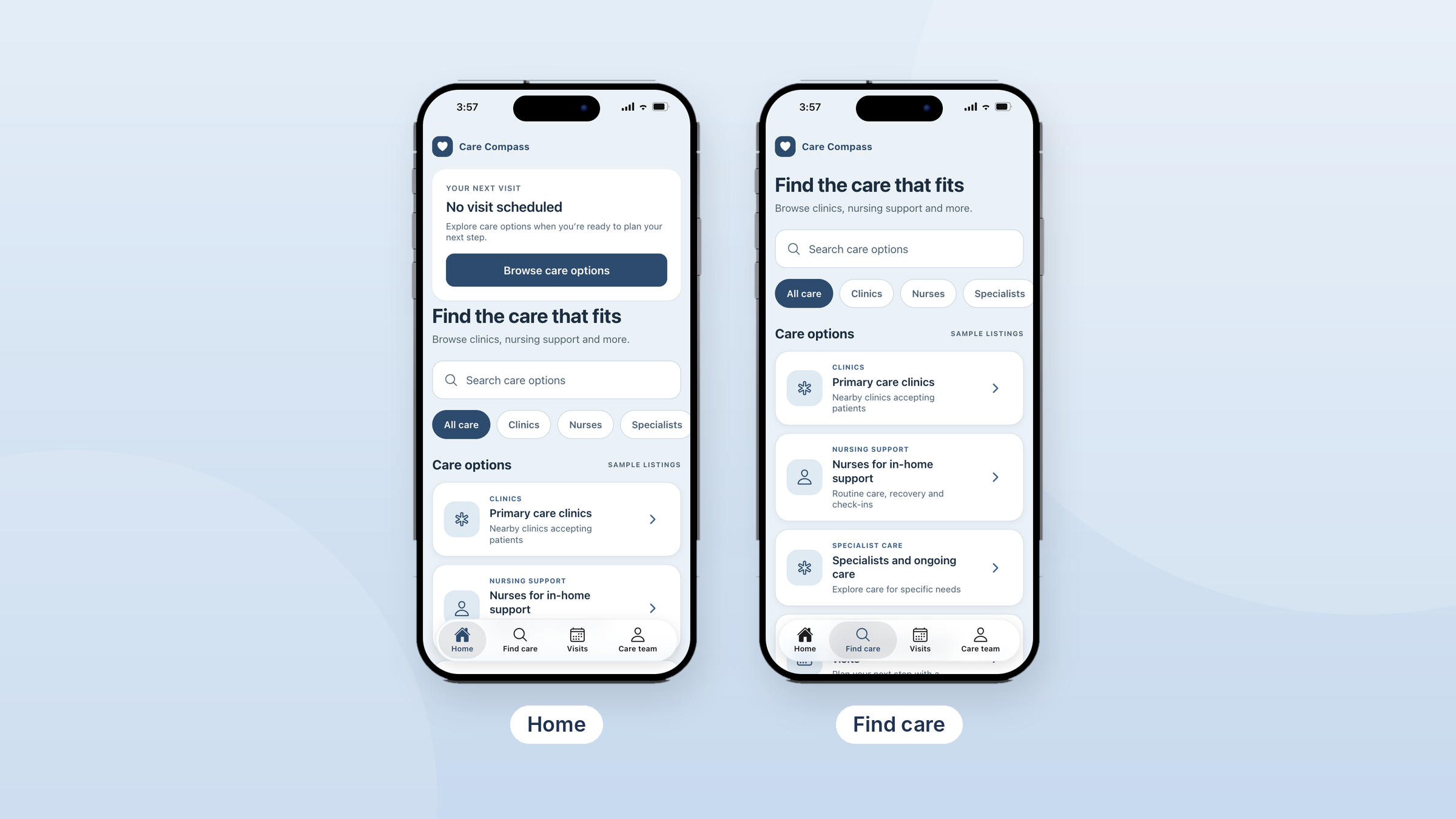
Inside an example app: Care Compass, built with Thunkable, helps people find the right kind of care and keep track of it.
- Home: Shows the next scheduled visit, with a shortcut to browse care options when nothing is booked yet.
- Find care: A search bar and quick filters for clinics, nurses and specialists, with listings like nearby primary care clinics accepting patients and nurses for in-home support.
- Visits: Upcoming and past appointments in one place.
- Care team: The clinics and providers a person has chosen.
Must-have features:
- Search and filter so patients can narrow care by type, need or location
- Login so patients and providers each have secure accounts
- Roles that give patients, staff and admins different screens and permissions
- Onboarding flows that guide new patients through intake, consent and setup step by step
Ways to extend it: add calendar and scheduling to book visits, in-app messaging with the care team, maps to show nearby clinics, or a clinician dashboard with charts.
Tip: Design the empty states. Care Compass never shows a blank screen: when no visit or care team exists yet, it offers a clear next step. Before launch, confirm your data handling meets the privacy rules that apply to you.
Which features does each health app need?

Why build your health app with Thunkable?
Thunkable is the AI-powered mobile app builder designed around mobile from day one, which matters for health apps people open every day and rely on in the moment. Founded in 2015 by researchers with roots at MIT and Google, Thunkable has more than 6 million users in 194 countries.
- AI builds it with you, and you stay in control. Describe who you're helping and get working screens and logic. Use Discuss Mode to plan and troubleshoot, then finish it yourself in the visual editor or edit code directly.
- Truly native device features. Native iOS and Android apps, not websites in a wrapper, with 25+ device features, including Bluetooth for health devices, camera, push notifications for reminders and biometrics to keep private entries behind a secure sign-in.
- A private account for every user. Add email, Google or Apple sign-in, and connect a free Supabase account for a cloud database that keeps each person's records tied to their own account.
- Easy to start. No design files or development tools needed to begin, so clinicians, caregivers and advocates can build without a technical team.
- A clear path to the stores. Publish to the App Store, Google Play and the web in a few clicks, with publishing guides and AI checklists along the way.
How to get started in 4 steps
- Describe your app. Tell the AI builder who it helps and what it does, for example “a medication tracker that reminds my dad and alerts me if he misses a dose.”
- Review the generated screens. Use Discuss Mode to plan features and refine the logic, or take direct control in the visual editor.
- Add native features. Add email, Google or Apple sign-in, connect a free Supabase account for your cloud database, then add device features like push notifications, camera, Bluetooth or text-to-speech. Thunkable supports 25+ native device features.
- Test and publish. Test with real users, then publish native apps to the App Store and Google Play.
Frequently asked questions
Can I build a health app without coding?
Yes. Thunkable's AI generates screens and logic from a description, with 25+ native device features ready to use. Add sign-in and connect a free Supabase account when you need a cloud database. No coding is required to get started.
What's the difference between a native app and a web app in a wrapper?
A native app is built for iOS and Android, so it can use device features like Bluetooth, biometrics and push notifications directly. A wrapped app is a website inside an app shell, which can feel slower and may lose access to some device features. For a health app people rely on daily, Thunkable builds native apps.
Can my app connect to health devices?
Yes. Bluetooth support lets your app connect to compatible devices like glucose meters, blood pressure cuffs and wearables. Expect device connections to take more setup than other features.
Can I add AI chat to a wellness app?
Yes. You can add an AI chat experience for guided journaling, reflection prompts or questions. Always point users to professional help and crisis resources.
Is a no-code health app HIPAA compliant?
Compliance depends on how your app collects, stores and shares health data, and it's the responsibility of the person or organization publishing the app. No app builder makes an app compliant on its own, so review the rules that apply to you, such as HIPAA in the US, and get legal advice before collecting health information.
Will my app be on the App Store and Google Play?
Yes. Thunkable builds native iOS and Android apps. Store publishing is included on the Builder and Advanced plans.
Build the health app you wish existed
You don't need a medical degree or a development team to build something that helps. You need a clear picture of who you're helping and what would make their day a little easier.
Your first step this week:
- Write one sentence about who your app helps and what it changes for them.
- List the three screens they'd use most.
- Describe it to the AI builder and see your first version take shape.
The people closest to a health challenge often know exactly what's missing. Turn that insight into a real app people can download and use every day.
View Pricing
If you’re an administrator or requesting multiple licenses for your school or district, our team will follow up with you directly to learn more and help set up the right Education plan. We’ll work with you to make sure Thunkable is the best fit for your districts/classrooms.
We also offer special discounts for individual students and educators. Apply below, and you’ll receive a promo code via email to claim your discounted Thunkable Education plan.


Related Resources
How to build a custom business management app without code

How to build an e-commerce or marketplace app without code
How to build a healthcare or wellness app without code
Start
Creating
Creating



Your idea can be live today.