True Native Apps vs. Progressive Web Apps: The Difference For Developers and Their Users
.png)
When people compare app builders, “native” and “progressive web app” (PWA) appear as if they are just minor footnotes; the kind of technical detail you can look up later once you’ve picked a tool.
This is most definitely not the case.
Whether a builder produces a native app or a PWA can affect three important things:
- What your app can actually do
- Where it can live for your users
- How it is able to perform
And all of that is before a single feature is even built.
What is a progressive web app?
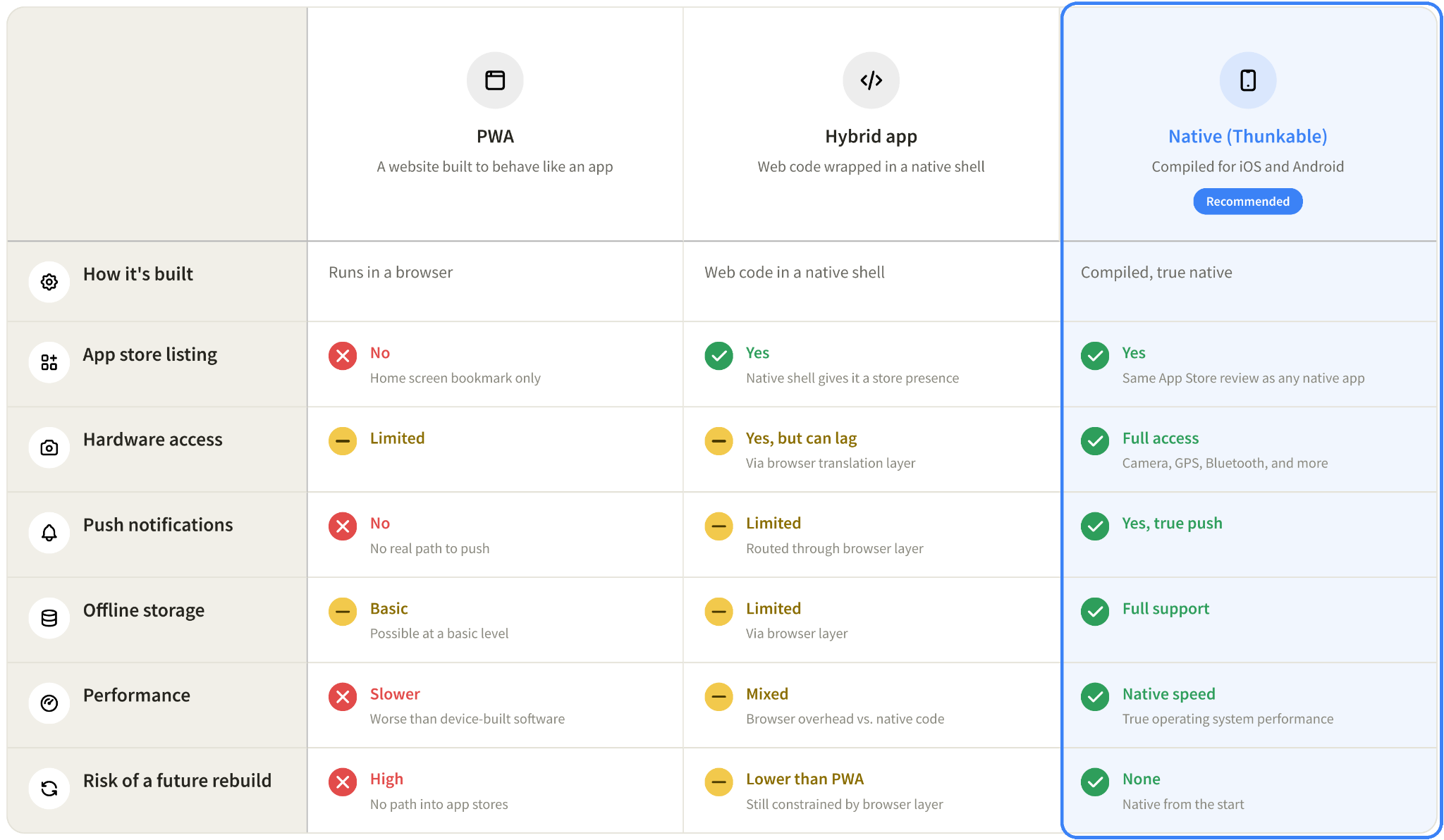
Remember this, as it is an incredibly important distinction for the functionality of your app: A progressive web app, or PWA, is a website built to behave like an app. Offline support and a home screen icon are both totally possible with a PWA, and on the surface, it can feel close to the real thing.
However, a PWA only runs through a web browser engine rather than compiling to native code, and that distinction carries significant differences and limitations.
PWAs, for instance, can’t be listed in the Apple App Store, which is the most revenue-generating app store in the world. Because PWAs run through the browser, access to certain device capabilities and performance can vary depending on the browser and operating system.
What is a true native app?
A native app is built to run directly on a mobile operating system like iOS or Android. Because it’s built for the device itself rather than running through a web browser, it can interact more directly with the phone’s features and operating system. That distinction is what unlocks full access to a mobile device’s different systems, such as:
- The camera
- GPS
- Bluetooth
- Push notifications
- Offline storage
- True operating system performance capabilities
Native apps also go through the same App Store review process as any other app, since app stores recognize them as full apps rather than as websites. Thunkable is one example of a platform that compiles this kind of true native app for iOS and Android directly from a project.
Where hybrid apps fit in
There is a third option between native and PWA: Hybrid apps.
A hybrid app combines elements of web and native apps. Much of the app is built using web technology, but it’s packaged as a mobile app so it can be installed on a device and distributed through app stores.
Hybrid apps sit in the middle drawer of a developer’s potential toolbox: More capable than a PWA, but still carrying a nice chunk of performance tradeoffs that come from routing through a browser instead of running as fully native code.
Most importantly, while hybrid apps can talk to device systems like the camera and the others listed above, it does so through that browser translation layer, which is where performance lag and loss will be felt by users the most. As you might expect, this could make or break user adoption and retention in pretty substantial ways.
Where Thunkable stands on app builders
Thunkable compiles a true native binary for iOS and Android from your project, which means what you build is what actually makes it to your users.
Several no-code app builders are PWA-only, so their apps can only live on a phone’s home screen as a bookmark with an icon, with no path into the Apple App Store or Google Play. If the plan for your app includes App Store distribution, real push notifications, or hardware access, that path should be available from the start. Thunkable gives developers the ability to create true native apps, which avoids rebuilds from PWAs later.
The real question to ask before you build
The difference between a native app and a PWA often does not show up right away. It tends to show up the first time someone expects a notification and does not get one, or the first time an app needs camera access and the browser layer gets in the way, or the first time someone tries to list an app on the App Store and finds out it is not possible with the tool they chose. Knowing which kind of app you are building, and why that matters for your specific idea, is worth figuring out before you start.
.jpg)
View Pricing
If you’re an administrator or requesting multiple licenses for your school or district, our team will follow up with you directly to learn more and help set up the right Education plan. We’ll work with you to make sure Thunkable is the best fit for your districts/classrooms.
We also offer special discounts for individual students and educators. Apply below, and you’ll receive a promo code via email to claim your discounted Thunkable Education plan.


Related Resources
How to Build a No-Code MVP Without a Technical Co-Founder
.png)
Agentic Engineering: The Next Level After Vibe Coding

.png)
Thunkable vs the top AI app builders: which one actually gets your app into the App Store?
Start
Creating
Creating



Your idea can be live today.