Thunkable vs Replit
Replit started as a place for developers to write and run code in the browser. Today its AI agent builds full-stack apps with login, a database and hosting built in, and it now makes mobile apps too.
That range is Replit's strength. It's also the reason it may not fit someone who wants a phone app and not a codebase. If you're weighing Replit alternatives for a mobile app, this post walks through where each tool fits.
Quick verdict: Thunkable is an AI mobile app builder for native iOS and Android apps. For a mobile app you don't have to manage as a codebase, it's the better fit, and it publishes to both stores from one place. Replit suits developers who want full control of the code.
Why founders and product teams choose Thunkable
- No codebase to babysit. Build with AI and refine in the visual editor. Code editing is there when you want it, not a requirement.
- Both stores, one place. Publish to the App Store, Google Play and the web in a few clicks, with publishing guides and AI checklists.
- Native from the start. 25+ device features, including camera, barcode scanning, GPS, push notifications, biometrics, NFC and Bluetooth.
- Built for speed. Opendoor used Thunkable to cut a mobile build from five to six months to an estimated six to eight weeks.
"I love that I don't have to sit there with Java, Python and try to integrate a bunch of different languages." (Blake Martin, founder, Billight)
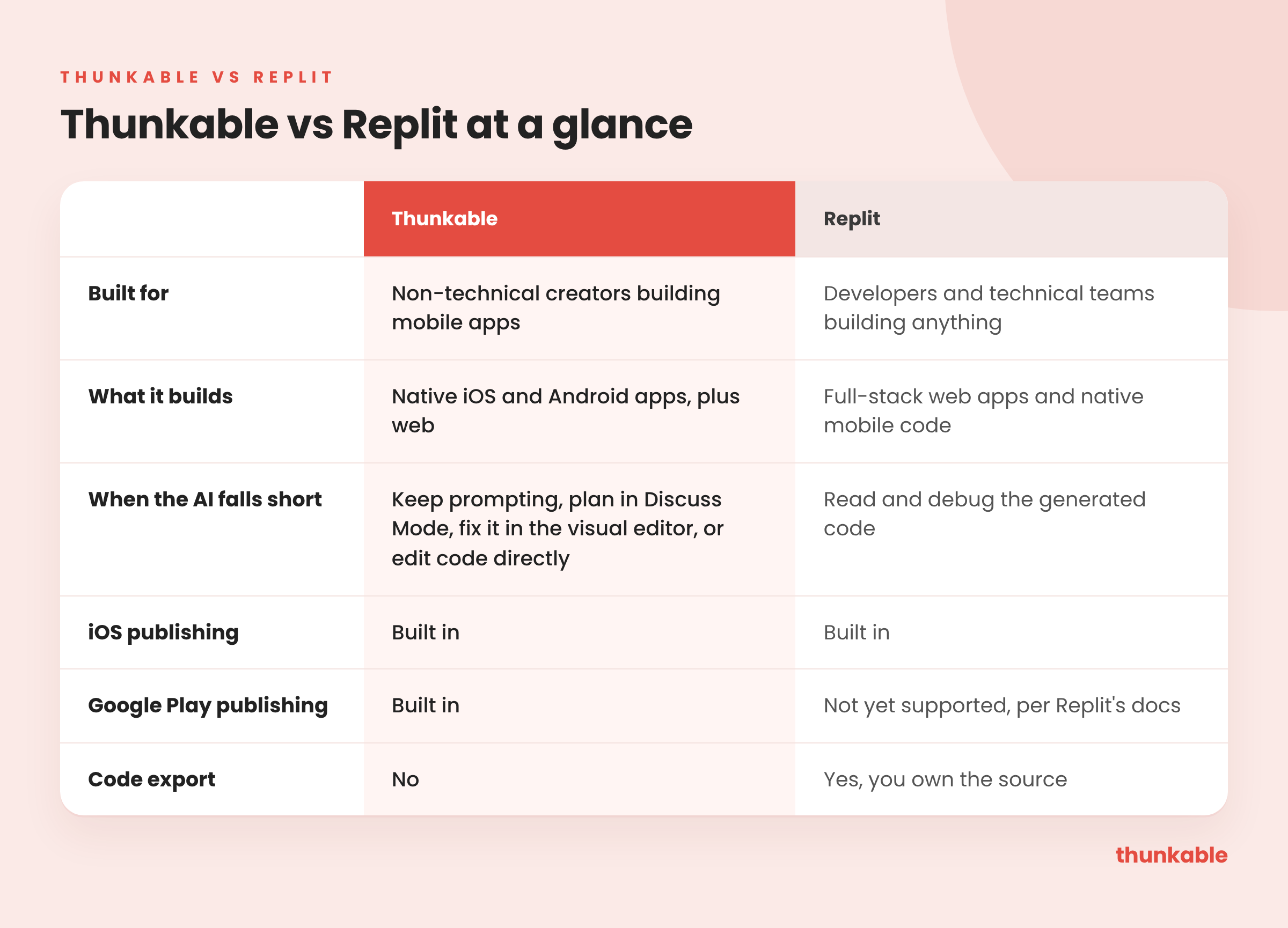
At a glance
What Replit is, and where it shines
Replit's pitch is "What will you build?" Its agent turns ideas into full-stack apps, and it's aimed at a wide audience: founders, product managers, designers, engineers, operations and IT teams.
Where it shines is flexibility. Technical builders get full source code, a backend they control, and web and mobile in one place. Replit now builds native mobile apps as React Native code through Expo, and it can upload iOS builds straight to App Store Connect. If you want to own every line and extend it later, Replit is a strong choice.
Can Replit build native mobile apps?
Yes, on both. Replit generates native mobile code, and Thunkable builds native iOS and Android apps from the first prompt.
The difference is what you get back. Replit hands you a codebase. Thunkable hands you an app you can see and change on screen, with 25+ native device features ready to use: camera, barcode scanning, GPS and maps, push notifications, biometrics, NFC, Bluetooth and motion sensors. In-app purchases, subscriptions and ads are built in too.
Can you finish and fix the app without code?
This is the biggest difference. On Replit, the AI writes code you own, which also means you own reading and debugging it. When the agent can't solve a problem, the next step is the code.
Thunkable doesn't ask you to think like a developer. When the AI gets close but not quite there, you can:
- Ask for the change in chat and keep building with AI.
- Use Discuss Mode to plan a change or troubleshoot before anything is built.
- Open the visual editor and adjust screens and logic yourself.
- Edit code directly if you want to. It's there when you need it, not the default.
Version History lets you roll back anytime.
Can Replit publish to the App Store and Google Play?
Replit guides you through iOS publishing with a TestFlight and App Store Connect flow. Android is a different story: Replit's own docs say publishing to Google Play is not yet supported.
Thunkable publishes to the App Store, Google Play and the web in a few clicks, from the same place you build. Publishing guides and AI checklists help you through review on both stores. As Nomad Journal founder Marco Ilagan put it: "The feature that really impressed me was that I can publish our app both on Apple and Android."
Replit vs Thunkable: the path to both stores
Replit's agent now builds iOS and Android apps with Expo, with a guided flow to TestFlight and the App Store. Google Play is the gap: Replit's own docs say publishing to Google Play is not yet supported.
Costs follow the agent's effort. Core is $20/mo with $20 in monthly credits that don't roll over, and usage past those credits is billed pay-as-you-go, according to Replit's own pricing page.
Where Thunkable comes out ahead: Replit rewards people who can read and steer code. Thunkable is built so you don't have to. You build with AI, fix things in the visual editor, and publish to both the App Store and Google Play from the same place, including the Android release Replit leaves to you.
Switching from Replit to Thunkable
If you started on Replit and the codebase has become the job, here's how to move the mobile app over:
- Keep your backend if it works. Thunkable's docs say its AI can connect your app to any third-party API, so an API you already host on Replit can stay where it is.
- Describe the app, not the code. List your screens and what each one does, then give that to Thunkable AI as your first prompt.
- Rebuild device features natively. Camera, barcode scanning, GPS, push notifications and biometrics are built in.
- Fix what's off visually. Use the visual editor instead of debugging generated code.
- Publish to both stores from one place, with publishing guides and AI checklists.
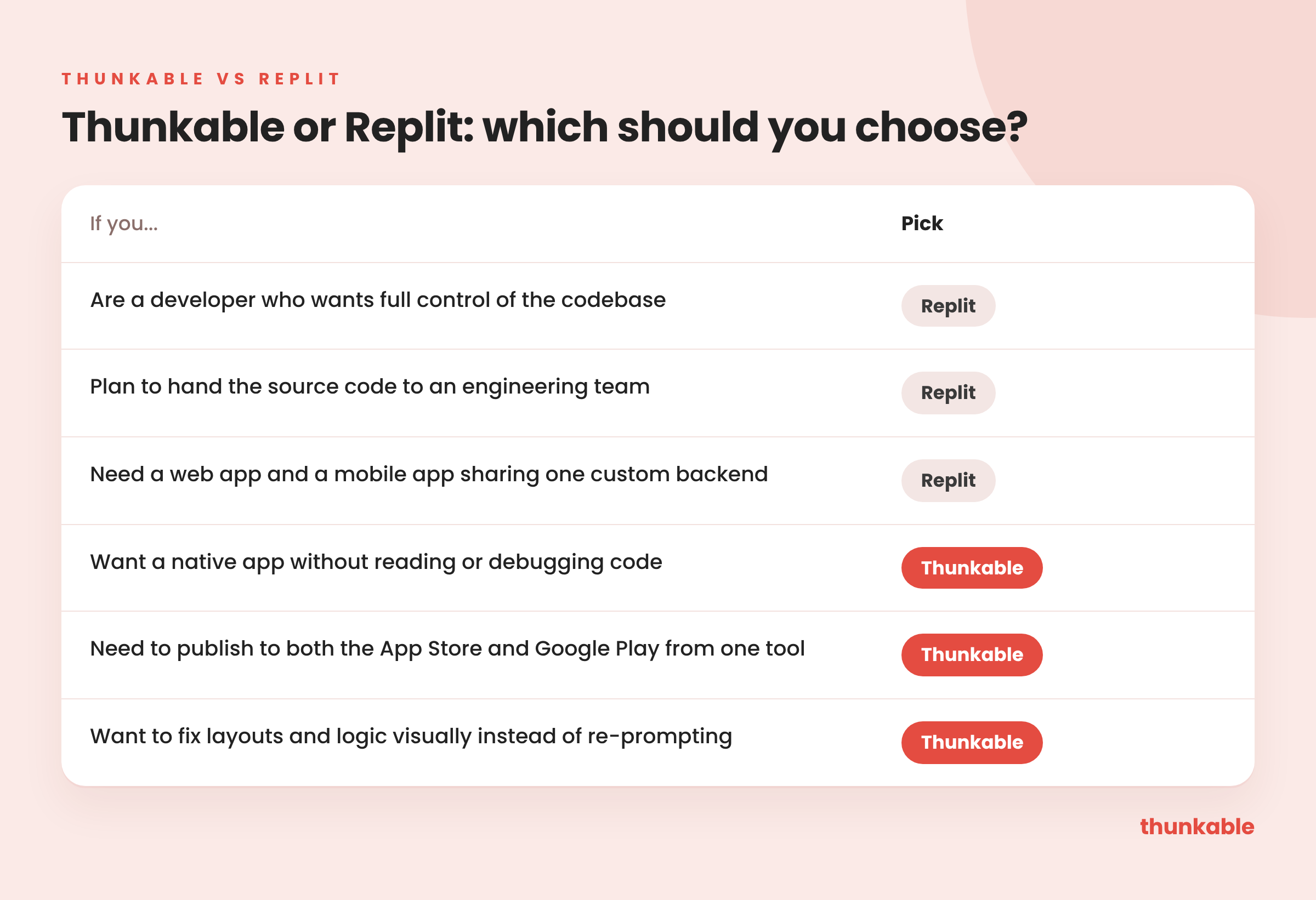
Which should you choose?
FAQ
- Is Thunkable a good Replit alternative? For mobile, yes. If you want a native app without managing a codebase, Thunkable gives you AI, a visual editor and publishing to both stores in one place.
- Can Replit build mobile apps? Yes. Replit generates native mobile code and supports iOS publishing. Its own docs say Google Play publishing is not yet supported.
- Is Thunkable easier than Replit? For non-technical creators, usually. Thunkable is built around a visual editor and AI, with code as an option. Replit is built around code.
- Can I edit code in Thunkable? Yes. Build entirely with AI, edit code directly, or use a hybrid approach.
Skip the code and the setup. Thunkable turns your idea into a native iOS and Android app and guides you through publishing to both stores.

View Pricing
If you’re an administrator or requesting multiple licenses for your school or district, our team will follow up with you directly to learn more and help set up the right Education plan. We’ll work with you to make sure Thunkable is the best fit for your districts/classrooms.
We also offer special discounts for individual students and educators. Apply below, and you’ll receive a promo code via email to claim your discounted Thunkable Education plan.


Related Resources
Thunkable vs Lovable
Thunkable vs Replit
Thunkable vs Bubble
Start
Creating
Creating



Your idea can be live today.