Thunkable vs Lovable
Lovable is often the first stop for founders who want to vibe code an idea. Type what you want, and it builds working web software. For a lot of products, that's exactly right.
But "app" can mean two different things. If your users will find you in a browser, Lovable fits. If they'll download you from the App Store or Google Play, you need a different kind of build. If you're looking for a Lovable alternative for mobile, this post compares the two on the questions that matter when you need a real iOS and Android app.
Quick verdict: Thunkable is an AI mobile app builder that turns a prompt into native iOS and Android apps. If your users will use your product on their phones, it's the stronger choice: a native app from the first prompt and a built-in path to both stores. Lovable is the better pick for products that live in a browser.
Why founders choose Thunkable for mobile
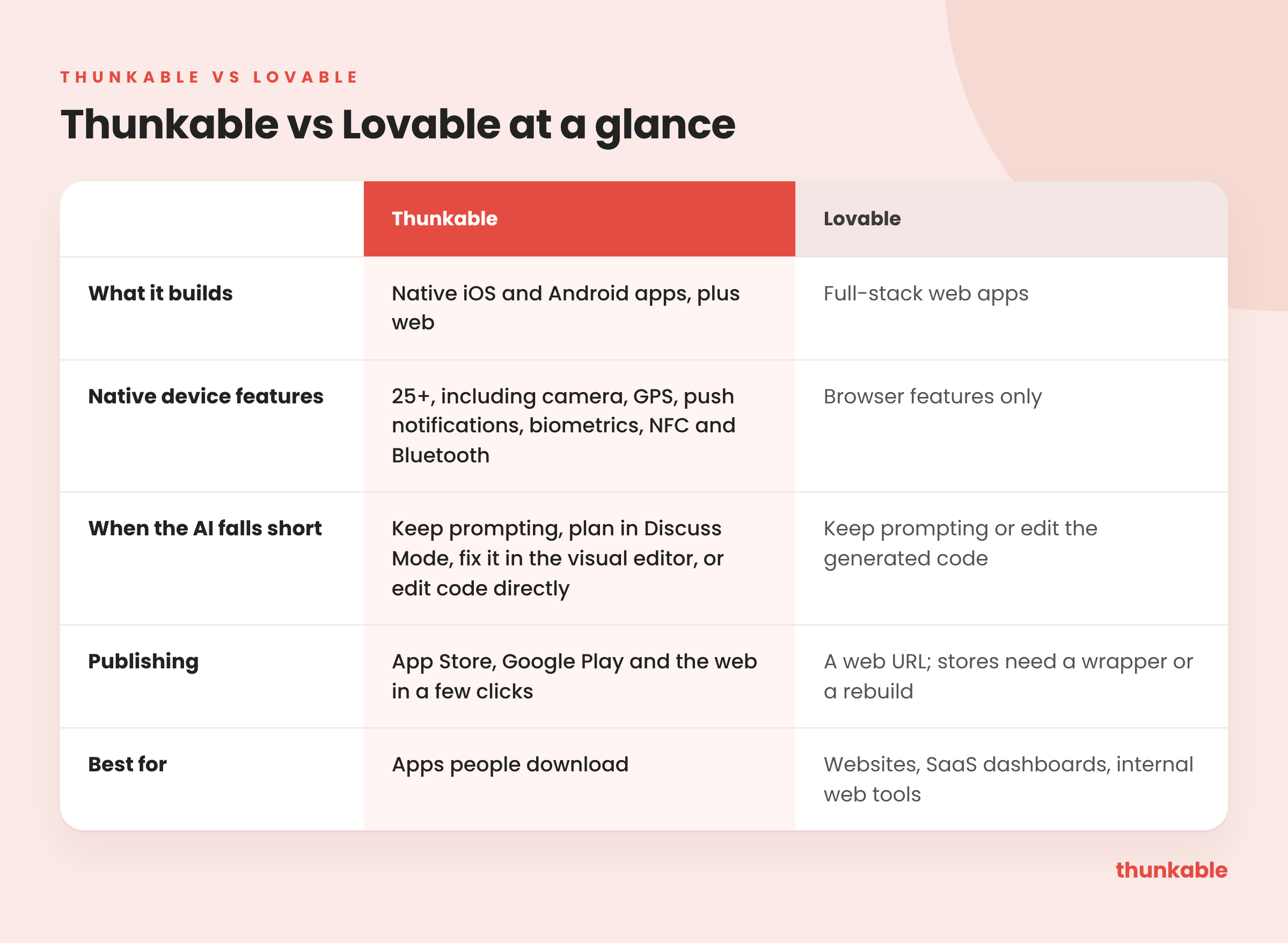
- A real app from the first prompt. Every project is a native iOS and Android app, with 25+ device features like camera, push notifications, GPS and biometrics.
- AI that hands you the controls. Keep building with AI, plan in Discuss Mode, fix things in the visual editor, or edit code directly.
- Publishing built in. Publish to the App Store, Google Play and the web in a few clicks, with publishing guides and AI checklists.
- Ways to earn. In-app purchases, subscriptions and ads are built in.
- A decade of mobile behind the AI. Launched in 2016, with more than 5 million creators.
At a glance
What Lovable is, and where it shines
Lovable turns plain-language prompts into full-stack web software, and it can host what you build.
Where it shines is anything that lives in a browser: SaaS dashboards, marketing sites, customer portals and internal tools your team opens on a laptop. If that's your product, Lovable is a strong pick.
Can Lovable make mobile apps?
No. Lovable's own documentation says it doesn't generate native mobile projects. Lovable does have a mobile app, but it lets you build projects from your phone. It doesn't turn your project into a phone app.
That matters more than it sounds. A native app can use the phone itself: the camera, GPS, push notifications, Face ID or Touch ID, NFC and Bluetooth. It sits on the home screen and appears in store search.
Thunkable builds native iOS and Android apps from the first prompt. Describe your idea and Thunkable AI generates the screens, layout and logic. Your app can use 25+ native device features, and in-app purchases, subscriptions and ads are built in.
Can you finish and fix the app yourself?
Every AI builder gets close and then needs a nudge. The question is what your next move is.
On Lovable, your options are another prompt or the generated code. On Thunkable, you have four:
- Keep building with AI. Ask for changes in chat.
- Plan first in Discuss Mode. Talk through a change or troubleshoot a problem before you ask the AI to build anything.
- Fix it visually. Adjust screens and logic directly in the visual editor, no prompt needed.
- Edit the code. Build entirely with AI, edit code directly, or use a hybrid approach.
Version History lets you roll back if a change doesn't work out.
Can you publish a Lovable app to the App Store?
Lovable's publishing ends at a web URL. To get into the App Store or Google Play, you have three options: wrap the site with a tool like Capacitor, pay for a third-party wrapper service, or rebuild the app somewhere else. Each one adds steps, and a wrapper brings the browser's limits with it.
On Thunkable, publishing is part of the tool you build in. You publish to the App Store, Google Play and the web in a few clicks, with publishing guides and AI checklists to help you through store review. As Guy Bacci, founder of Pennant Chase, put it: "I loved how simple Thunkable made the App Store submission process."
Lovable vs Thunkable: what it takes to get on a phone
Lovable's own guide says its output is a web app, with no iOS or Android binaries and no App Store submission. Its April 2026 mobile app lets you build from your phone, but what you build is still a website, according to Lovable's docs.
Lovable's own FAQ says its apps aren't native: getting into the stores means wrapping the app with a tool like Capacitor, outside Lovable, and submitting it yourself. Lovable also bills building, hosting and in-app AI from one credit balance, with Pro starting at 100 credits a month, and live apps on its backend pause when that balance runs out, according to Lovable's own docs.
Where Thunkable comes out ahead: On Thunkable, the native app and the path to both stores are part of the product, not an add-on. There's no wrapper to set up, no export to Xcode, and no developer to hire for the last mile. When something looks off, you fix it in the visual editor instead of sending another prompt.
Switching from Lovable to Thunkable
You don't have to throw away what you built. Many founders keep Lovable for the website and build the phone app on Thunkable.
- Write down what works. List your screens, user flows and data. That list becomes your first prompt.
- Describe it to Thunkable. Thunkable AI generates the screens, layout and logic for a native app.
- Add what the web version couldn't do. Push notifications, camera, GPS, biometrics, in-app purchases.
- Connect your data. Use Supabase cloud storage for user accounts and data shared across devices, or keep the backend you have: Thunkable's docs say its AI can connect to any API-based database or backend.
- Publish. Send it to the App Store and Google Play with publishing guides and AI checklists.
Which should you choose?
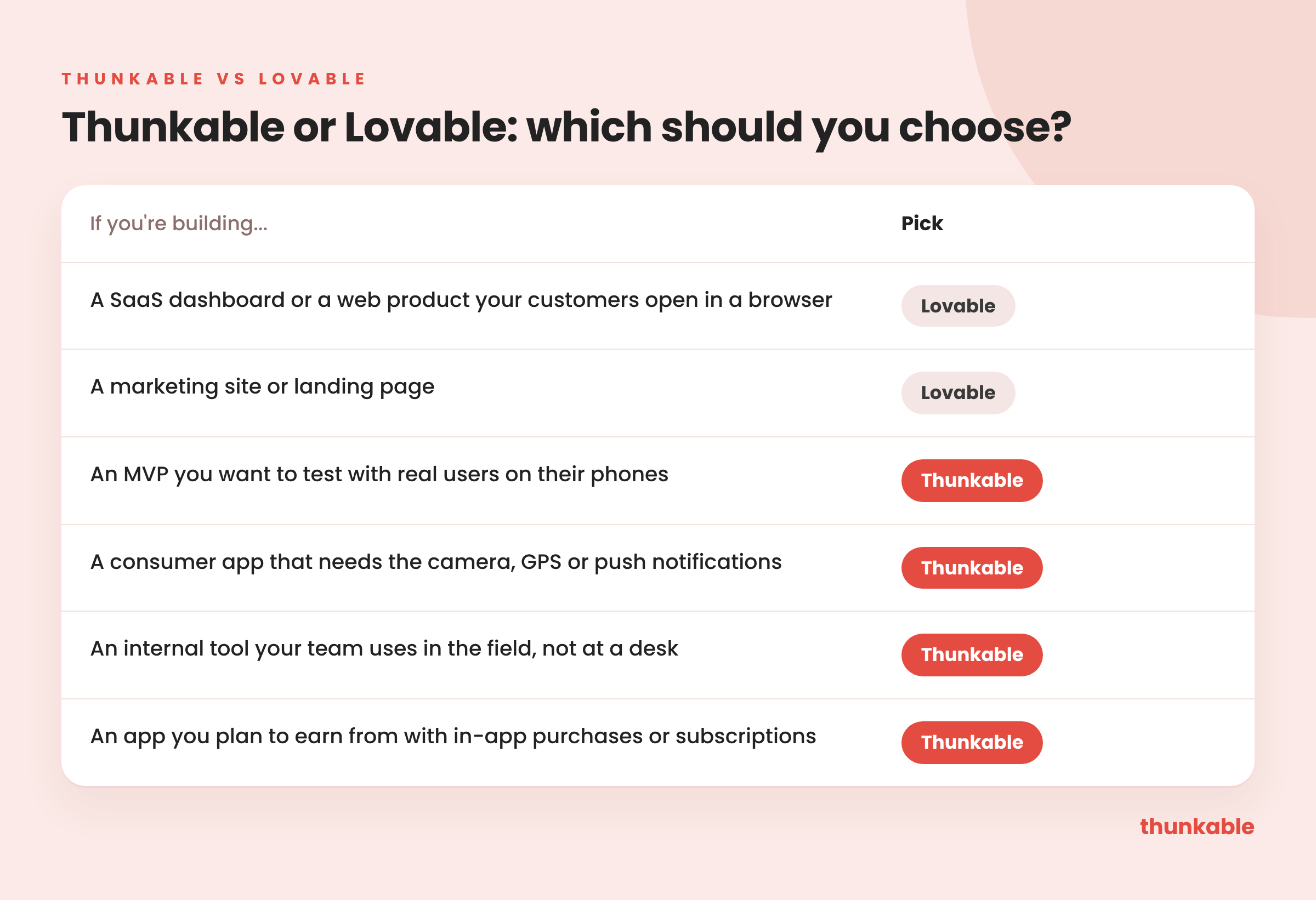
Some founders use both: Lovable for the marketing site and Thunkable for the app.
FAQ
- Can Lovable make an iPhone app? Not natively. Lovable builds web apps. Getting into the App Store means wrapping the site or rebuilding it.
- Is Thunkable a Lovable alternative for mobile? Yes. If you like building with prompts but need a native app, Thunkable gives you the same start from a sentence, plus a visual editor, code editing and a built-in path to both stores.
- Do I need to code to use Thunkable? No. Describe your app and AI gets you started. Refine it with more prompts or the visual editor, and edit code directly only if you want to.
- Is Thunkable free? You can start generating your app for free. Publishing to the App Store and Google Play starts on the Builder plan.
Build the app, not just the website. Describe your idea and get a native iOS and Android app you can test, improve and publish yourself.

View Pricing
If you’re an administrator or requesting multiple licenses for your school or district, our team will follow up with you directly to learn more and help set up the right Education plan. We’ll work with you to make sure Thunkable is the best fit for your districts/classrooms.
We also offer special discounts for individual students and educators. Apply below, and you’ll receive a promo code via email to claim your discounted Thunkable Education plan.


Related Resources
Thunkable vs Lovable
Thunkable vs Replit
Thunkable vs Bubble
Start
Creating
Creating



Your idea can be live today.