Thunkable vs Flutterflow
Of every AI app builder out there, FlutterFlow is the closest to Thunkable on mobile. Both build native apps. Both have visual editors. Both now use AI to help you start.
The difference is who each one is built for. FlutterFlow is a low-code tool for people comfortable with developer concepts who want to export their code. Thunkable is built for creators who want to go from an idea to a published app without learning a framework first. If the learning curve is what's slowing you down, that makes Thunkable the FlutterFlow alternative to look at.
Quick verdict: Thunkable is an AI mobile app builder for native iOS and Android apps, with no coding required. For creators who want to build and publish a native app themselves, it's the faster path: you start from a sentence, not a framework. FlutterFlow makes sense when exporting code is a must.
Why designers and creators choose Thunkable
- Start from a sentence, not a canvas. Thunkable AI generates your screens, layout and logic.
- No framework to learn first. No design files, database setup or dev tools needed to begin.
- Control without the jargon. Refine in the visual editor, plan changes in Discuss Mode, or edit code when you want to.
- Past the mockup. Take your concept into a working native app with 25+ device features, then publish to both stores in a few clicks.
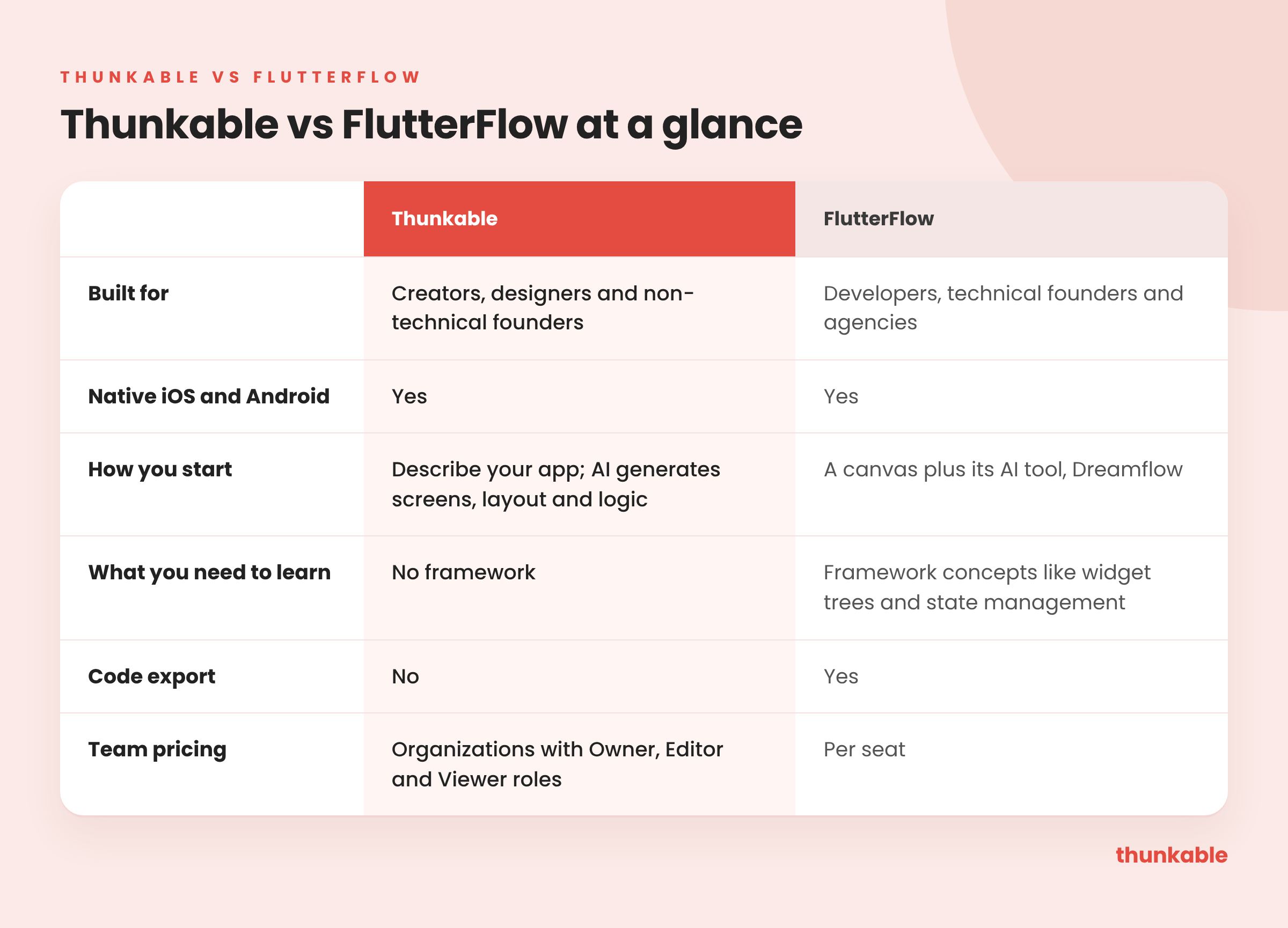
At a glance
What FlutterFlow is, and where it shines
FlutterFlow describes itself as a visual development platform for mobile, web and desktop. Its pitch is "Build better. Launch faster." It includes code export, team collaboration and an AI tool called Dreamflow.
It shines when engineers are part of the plan. If you have developers on the team and plan to export the code and extend it by hand, FlutterFlow is a solid choice. Agencies that hand finished code to clients like it for the same reason.
Does FlutterFlow build native mobile apps?
Yes, on both. This is where FlutterFlow and Thunkable are most alike, and why people often compare them.
Thunkable gives you 25+ native device features out of the box: camera, barcode scanning, GPS and maps, push notifications, biometrics, NFC, Bluetooth and motion sensors. In-app purchases, subscriptions and ads are built in.
How long does FlutterFlow take to learn?
Here's where the two split. FlutterFlow is low-code, not no-code. FlutterFlow's own docs teach framework concepts like the widget tree and state management, and you'll work with them as you go.
Thunkable starts from a sentence instead of a blank canvas. Thunkable AI generates your screens, layout and logic. Then you choose how to keep going:
- Keep building with AI by asking for changes in chat.
- Use Discuss Mode to plan and troubleshoot before you build.
- Refine it in the visual editor when you'd rather move things yourself.
- Edit code directly when you need control the editor doesn't give you.
No design files or dev tools are needed to begin. Data can live on the device, or in Supabase cloud storage when your app needs user accounts and sync across devices.
FlutterFlow pricing and publishing vs Thunkable
Both tools can get you to the App Store and Google Play. Thunkable publishes to both stores and the web in a few clicks, with publishing guides and AI checklists to help you through review.
Cost shapes the decision too. FlutterFlow's team plans are priced per seat, which adds up as a team grows. Basic is $39/mo and Pro is $80/mo for the first seat, according to FlutterFlow's pricing page. On Thunkable, store publishing is included on the Builder plan (1 published app) and the Advanced plan (unlimited published apps).
FlutterFlow vs Thunkable: time to your first app
FlutterFlow's own quickstart walks you through the widget tree and state management, so the framework comes before the app.
Costs climb with team size. Basic is $39/mo, Pro is $80/mo with each extra seat at $55, and a five-seat Max team runs $490/mo, according to FlutterFlow's pricing page.
Where Thunkable comes out ahead: FlutterFlow asks you to learn a framework before you're productive. Thunkable starts from a description: AI generates the screens, layout and logic. The visual editor and code editor are there whenever you want more control, but you never need them to get started.
Switching from FlutterFlow to Thunkable
If you chose FlutterFlow for native apps but spend more time learning the framework than building, here's the path:
- Screenshot your key screens. They make a strong brief for your first prompt.
- Describe the app to Thunkable AI. It generates the screens, layout and logic.
- Rebuild logic visually or with AI. Use Discuss Mode to plan anything complex first.
- Connect your data. Use Supabase cloud storage for user accounts and data shared across devices, or keep the backend you have: Thunkable's docs say its AI can connect to any API-based database or backend.
- Publish to both stores, with publishing guides and AI checklists.
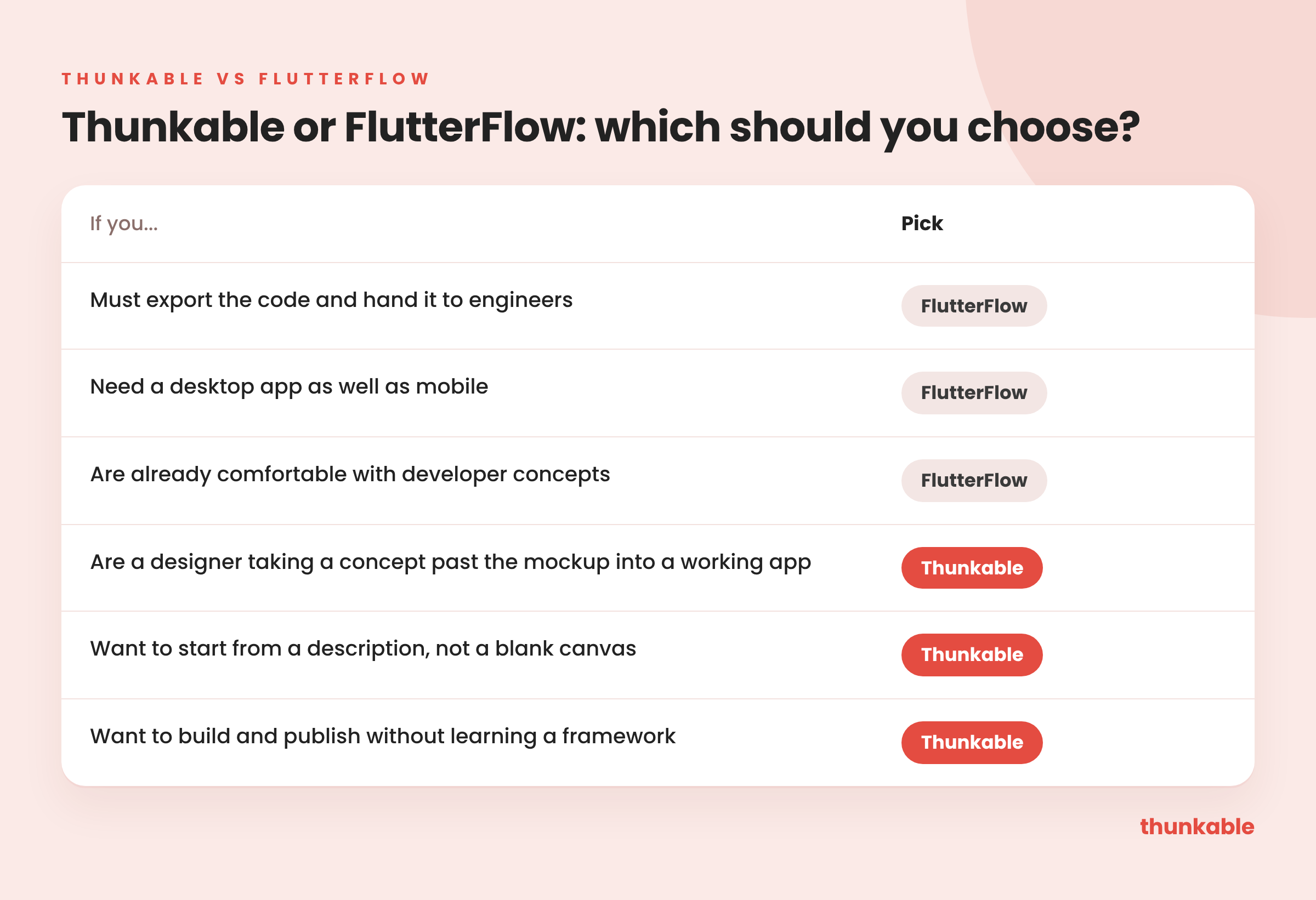
What you give up: code export. If you need to hand Flutter code to engineers later, stay on FlutterFlow.
Which should you choose?
FAQ
- Is Thunkable a good FlutterFlow alternative? Yes, if you want a native app without learning a framework. You start from a description, refine visually, and publish to both stores.
- Is FlutterFlow no-code? Not quite. You can build visually, but FlutterFlow's own docs have you work with framework concepts like the widget tree and state management.
- Do Thunkable and FlutterFlow both build native apps? Yes. Both build native iOS and Android apps you can publish to the stores.
- Which is easier for beginners? Thunkable is built for creators, not developers. You start from a sentence and don't need to learn a framework.
- Built for creators, not developers. Describe your idea and get a native app you can publish without learning a framework.

View Pricing
If you’re an administrator or requesting multiple licenses for your school or district, our team will follow up with you directly to learn more and help set up the right Education plan. We’ll work with you to make sure Thunkable is the best fit for your districts/classrooms.
We also offer special discounts for individual students and educators. Apply below, and you’ll receive a promo code via email to claim your discounted Thunkable Education plan.


Related Resources
Thunkable vs Flutterflow
Thunkable vs Bolt
Thunkable vs Emergent
Start
Creating
Creating



Your idea can be live today.