Thunkable vs Bolt
Bolt asks "What will you build today?" and then builds it with you in a chat. Websites and quick web prototypes come together fast, with a backend and hosting included. It can make mobile apps too.
For many builders, though, the hardest part of a mobile app isn't building it. It's getting it into the App Store and Google Play. That's where these two tools take very different paths, and why many builders look for a Bolt.new alternative for mobile.
Quick verdict: Thunkable is an AI mobile app builder that publishes native iOS and Android apps to both stores. For a mobile app, for the stores or for your team, it gets you from prompt to published without a terminal. Bolt is a good pick for a fast website if you're comfortable with command lines.
Why founders and agencies choose Thunkable for mobile
- Mobile from the first prompt. Every project is a native iOS and Android app, so there's no web project to convert later.
- No terminal, no build tools. Publish to the App Store, Google Play and the web in a few clicks, with publishing guides and AI checklists.
- Fix it without re-prompting. Adjust screens and logic in the visual editor, or edit code directly.
- Client-ready. Publish white-label apps under your client's brand on Builder and Advanced plans.
"This is the first time that we were able to turn around such a short timeframe so the customer can have the app." (Ross Dwyer, Frontend Developer, Vaco Consulting)
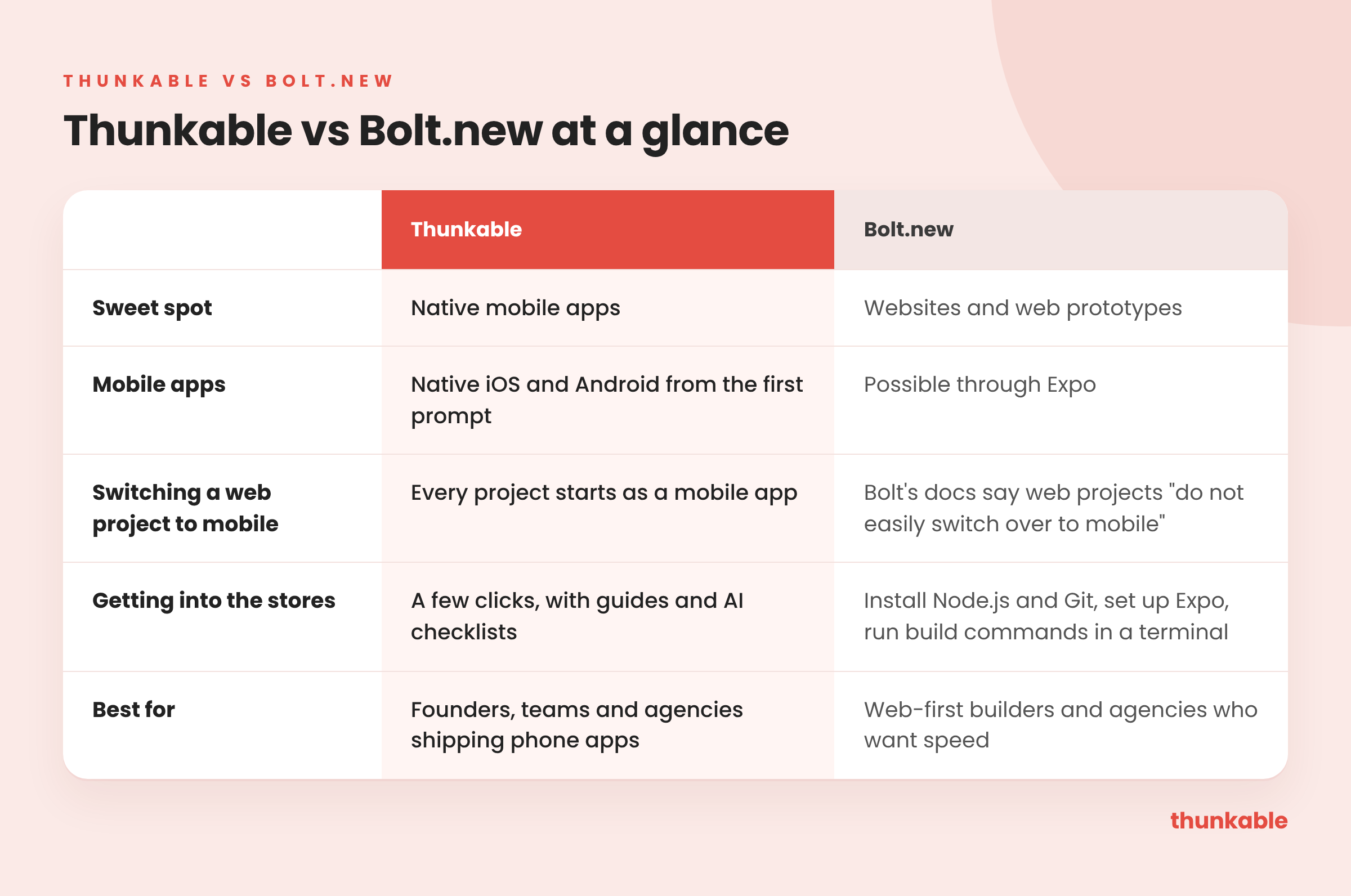
At a glance
What Bolt is, and where it shines
Bolt creates apps and websites by chatting with AI, with a built-in backend and hosting. It's aimed at product managers, entrepreneurs, marketers, agencies and students.
It shines at speed on the web. If you need a landing page, a marketing site or a clickable web prototype by Friday, Bolt is a good pick.
Can Bolt build mobile apps?
Bolt can make mobile apps through Expo. But the choice has to come early: Bolt's own help docs warn that projects started for web "do not easily switch over to mobile." If you start on the web and later decide you need an app, you may be starting over.
On Thunkable, every project is a native iOS and Android app from the first prompt. You get 25+ native device features, including camera, barcode scanning, GPS and maps, push notifications, biometrics, NFC and Bluetooth, and the same app can also publish to the web.
Can you finish and fix the app yourself?
On Bolt, the main ways forward are another prompt or the code. On Thunkable, you can keep building with AI, plan and troubleshoot in Discuss Mode, adjust screens and logic in the visual editor, or edit code directly. Version History lets you roll back anytime.
How do you publish a Bolt.new app to the App Store?
This is the biggest difference. Bolt's speed stops where publishing starts. To get a Bolt mobile app into the stores, you:
- Install Node.js and Git on your computer
- Set up an Expo account
- Run build commands in a terminal
- Submit the builds to each store
For a non-technical builder, those steps are often the hardest part of the whole project.
Thunkable keeps the whole trip in one place. You publish to the App Store and Google Play from Thunkable in a few clicks, with publishing guides and AI checklists along the way. As Bryan Alderson of Norma Pacific put it: "At the end of the [fourth] week, I had deployment on Google Play."
Bolt.new vs Thunkable: getting into the stores
Bolt's own Expo guide shows the path: configure Expo Application Services with terminal commands, create production builds, then submit through App Store Connect and Google Play Console yourself.
Bolt bills in AI tokens, from $25/mo for 10M on Pro. Each edit reads more of your codebase as the app grows, so the same change costs more later, according to Bolt's own docs.
Where Thunkable comes out ahead: On Bolt, edits cost more as your codebase grows, and the store release happens in a terminal. On Thunkable, every project is a native app from the first prompt, and publishing to the App Store and Google Play happens in the same tool you build in.
Switching from Bolt to Thunkable
If you built a web prototype on Bolt and now need a phone app:
- Keep the web version. Bolt is a fine home for your website or landing page.
- Use the prototype as your brief. Describe its screens and flows to Thunkable AI.
- Add native features. Push notifications, camera, GPS and biometrics are built in.
- Skip the terminal. Publish to the App Store and Google Play from Thunkable, with publishing guides and AI checklists.
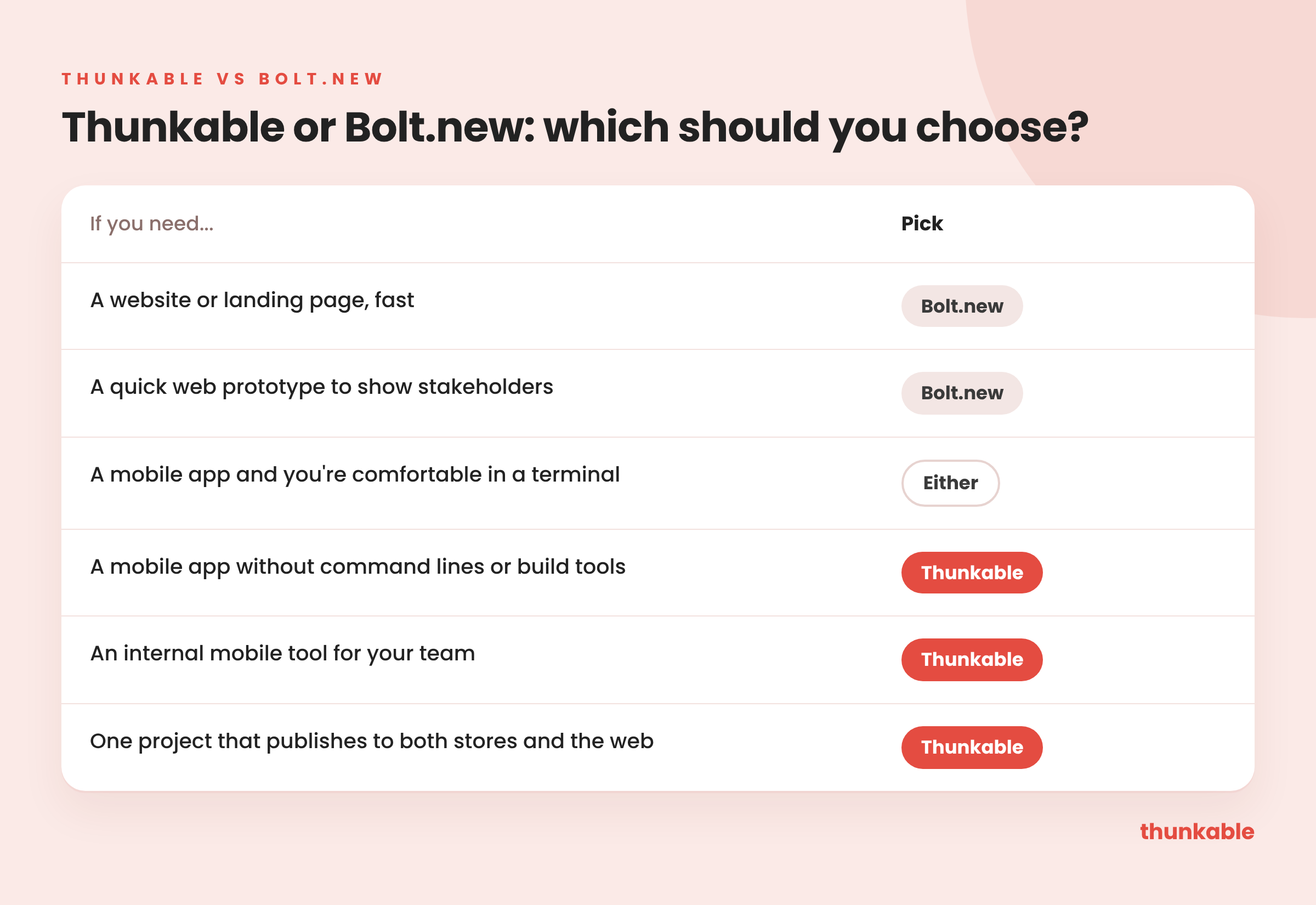
Which should you choose?
FAQ
- Is Thunkable a good Bolt.new alternative? For mobile, yes. Every Thunkable project is a native app, and you publish to both stores without a terminal.
- Can Bolt.new publish to the App Store? Yes, through Expo, but it takes Node.js, Git, an Expo account and terminal commands.
- Can I switch a Bolt web project to mobile? Bolt's own docs say web projects don't easily switch over to mobile.
- Do I need a terminal to publish with Thunkable? No. You publish to the App Store, Google Play and the web from Thunkable.
- Is publishing free on Thunkable? No. You can generate your app for free; store publishing starts on the Builder plan.
- No terminal required. Go from prompt to the App Store and Google Play without command lines or build tools.

View Pricing
If you’re an administrator or requesting multiple licenses for your school or district, our team will follow up with you directly to learn more and help set up the right Education plan. We’ll work with you to make sure Thunkable is the best fit for your districts/classrooms.
We also offer special discounts for individual students and educators. Apply below, and you’ll receive a promo code via email to claim your discounted Thunkable Education plan.


Related Resources
Thunkable vs Flutterflow
Thunkable vs Bolt
Thunkable vs Emergent
Start
Creating
Creating



Your idea can be live today.