Thunkable vs Adalo
Adalo is a no-code builder that compiles native iOS and Android apps. Its AI builder, Ada, can generate screens, a database, login and navigation, and Adalo's pricing page says paid plans carry no usage charges.
So on paper, Adalo and Thunkable look alike. The difference shows up after the first draft: what you do when your app needs to change, and what happens when it needs to do more. That's what to weigh when you're looking for an Adalo alternative.
Quick verdict: Thunkable is an AI mobile app builder for native iOS and Android apps. For an app that will keep growing, it gives you more room: AI that keeps building with you, code access when you need it, and 25+ native device features. Adalo fits simple apps that stay within its built-in actions, where a flat price matters most.
Why builders choose Thunkable when their app needs to grow
- AI that stays after the first draft. Ask for changes in chat and plan bigger ones in Discuss Mode, instead of rebuilding screen by screen.
- No ceiling on logic. When preset actions aren't enough, edit code directly.
- Deep device access. 25+ native device features, including biometrics, NFC, Bluetooth and motion sensors.
- Ready to earn. In-app purchases, subscriptions and ads are built in.
- White-label publishing. Publish under your own brand, with no Thunkable branding, on Builder and Advanced plans.
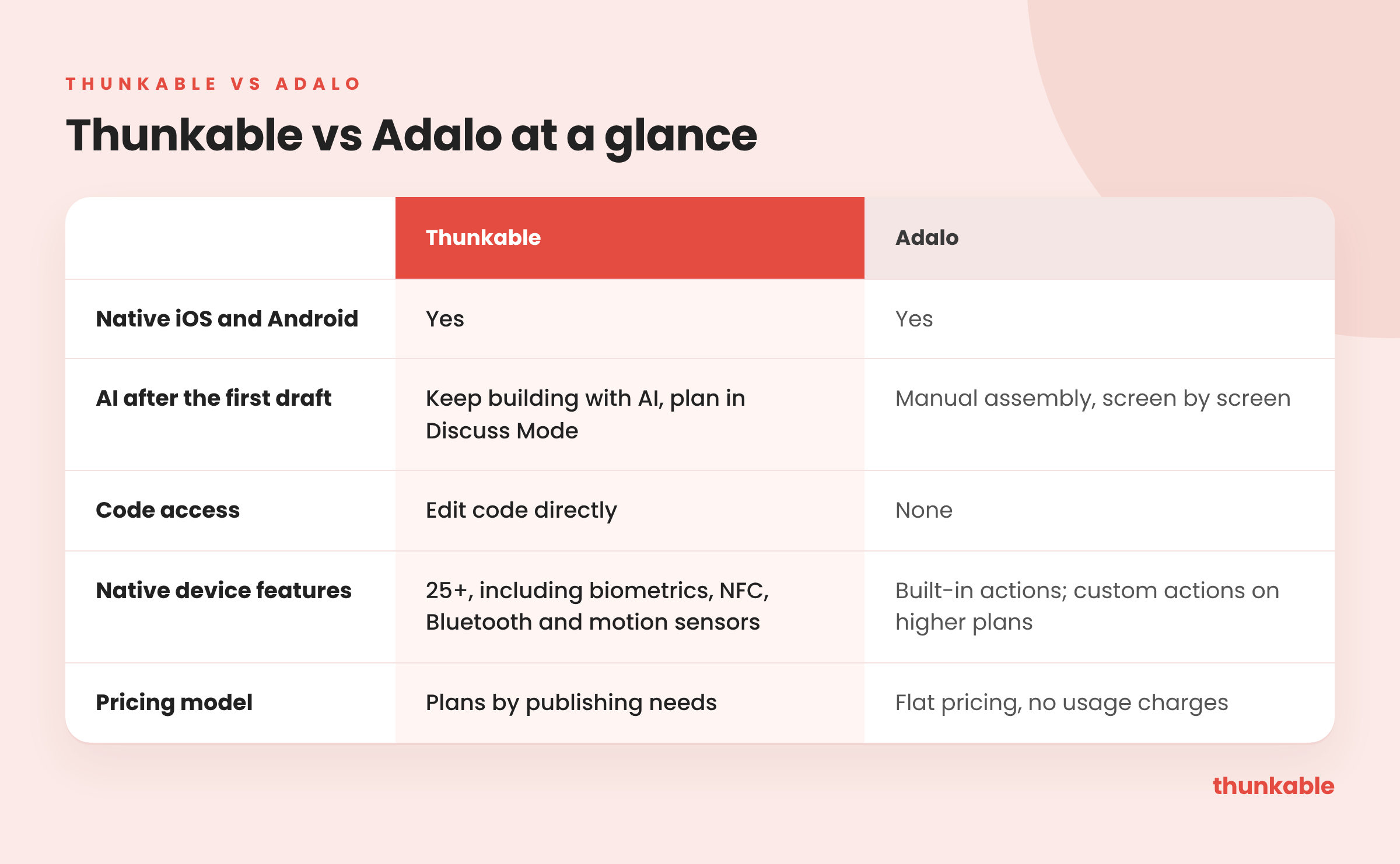
At a glance
What Adalo is, and where it shines
Adalo is a no-code builder for native mobile apps. Ada, its AI builder, gives you a starting point, and then you assemble the app with drag-and-drop components.
It shines on simple apps that fit its built-in actions, at a predictable price. If your app is a directory, a booking form or a basic member app and you don't expect it to grow much, Adalo can be a good fit.
Does Adalo build native mobile apps?
Yes, on both. Adalo compiles native iOS and Android apps, and so does Thunkable.
The gap is in how far each one goes on the device. Thunkable has more native device features, including camera, barcode scanning, GPS and maps, push notifications, biometrics, and Bluetooth. In-app purchases, subscriptions and ads are built in. Adalo's own help center lists camera uploads, location and push notifications, and says Bluetooth is not currently supported. Subscriptions on Adalo run through IAPHUB, a third-party service that's paid once your app goes live, according to Adalo's docs.
Can you finish and fix an Adalo app yourself?
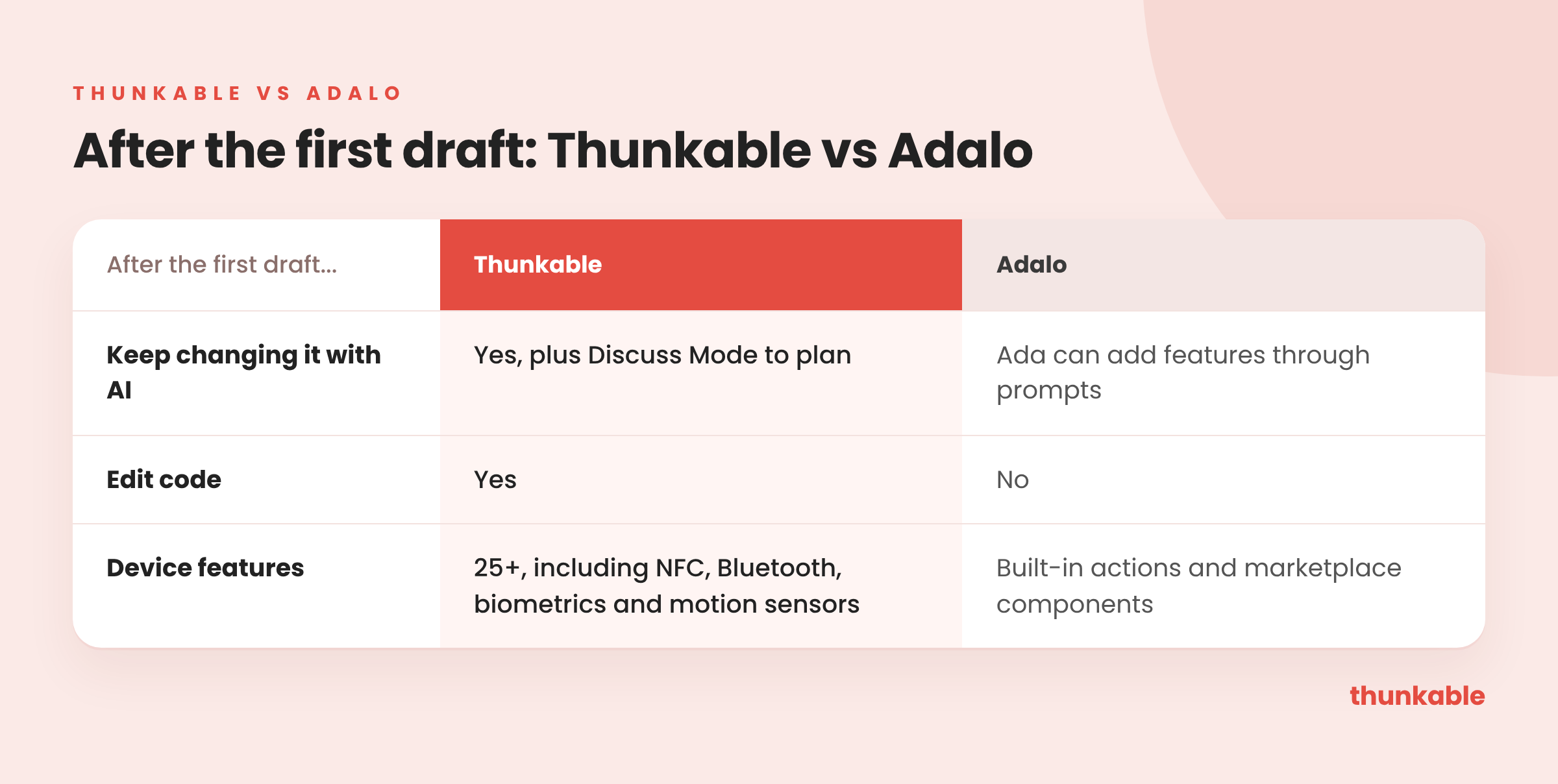
After Adalo's first AI draft, you can keep adding features with prompts, but the fine-tuning is manual: you drag components and wire up data connections, screen by screen. There's no way to edit or export the code; Adalo's help center says code export is not currently supported. When your app needs more than the built-in actions, you're limited to what the platform supports. Custom integrations and custom actions start on the Builder plan, at $65/mo, according to Adalo's pricing page.
Thunkable keeps the AI working with you after the first draft:
- Ask for changes in chat instead of rebuilding by hand.
- Use Discuss Mode to plan a feature or troubleshoot a problem.
- Adjust screens and logic in the visual editor.
- Edit code directly when you need more than preset actions.
Can you publish an Adalo app to both stores?
Both tools publish to the App Store and Google Play. Thunkable does it in a few clicks, with publishing guides and AI checklists, and publishes to the web from the same project.
Where the real difference is now
Ada AI makes Adalo a better starting point than it was. But the first draft is the easy part. What sets Thunkable apart is everything after it:
Switching from Adalo to Thunkable
- Export your data. Download each collection as a CSV from Adalo's Database tab, one collection at a time. Adalo's docs note that the "many" side of a relationship isn't included in the file, so plan to reconnect those links.
- Describe the app to Thunkable AI. Use your current screens as the brief.
- Add what you couldn't before. Bluetooth, NFC, motion sensors, or custom logic in code.
- Connect a database. Use Supabase cloud storage for user accounts and data shared across devices.
- Publish to both stores when you're ready, with publishing guides and AI checklists.
Which should you choose?

FAQ
- Is Thunkable a good Adalo alternative? Yes, especially if your app will grow. You get AI that keeps building with you, code access, and 25+ native device features.
- Does Adalo build native apps? Yes. Adalo compiles native iOS and Android apps.
- Can you edit code in Adalo? No. Adalo's help center says code export is not currently supported. In Thunkable, you can build entirely with AI, edit code directly, or use a hybrid approach.
- Which is better for apps that use Bluetooth or sensors? Thunkable supports 25+ native device features, including NFC, Bluetooth and motion sensors.
- Is Thunkable free? You can generate your app for free. Store publishing is on the Builder and Advanced plans.
Keep building after the first draft. Start with a prompt, keep building with AI, or take direct control when you need it.

View Pricing
If you’re an administrator or requesting multiple licenses for your school or district, our team will follow up with you directly to learn more and help set up the right Education plan. We’ll work with you to make sure Thunkable is the best fit for your districts/classrooms.
We also offer special discounts for individual students and educators. Apply below, and you’ll receive a promo code via email to claim your discounted Thunkable Education plan.


Related Resources
Thunkable vs Emergent
Thunkable vs Adalo
How first-time students build real apps with Thunkable
Start
Creating
Creating



Your idea can be live today.