Thunkable vs the top AI app builders: which one actually gets your app into the App Store?

AI app builders all promise the same thing: describe your idea and get an app. But "app" means different things on different platforms. On some, it's a website. On others, it's a codebase you're expected to maintain. If you want a real app built for phones, one you can test with users, roll out to your team, or publish to the App Store and Google Play, the list of real options gets much shorter.
We looked at eight popular AI and no-code builders: Lovable, Replit, FlutterFlow, Adalo, Bolt.new, Base44, Emergent and Bubble. For each one, we asked three questions:
- Does it build a native iOS and Android app, or a web app in a wrapper?
- Can you finish and fix the app yourself when the AI gets close but not quite there?
- How hard is it to get the app to your users, whether that's the App Store, Google Play, the web or your own team?
Every one of these tools is good at something. This guide is about which one fits when mobile is the goal. Thunkable is our product, so we've kept this fair: competitor details come from each company's own docs and pricing pages, every section says when the other tool is the better pick, and we're clear about where Thunkable isn't the right fit.
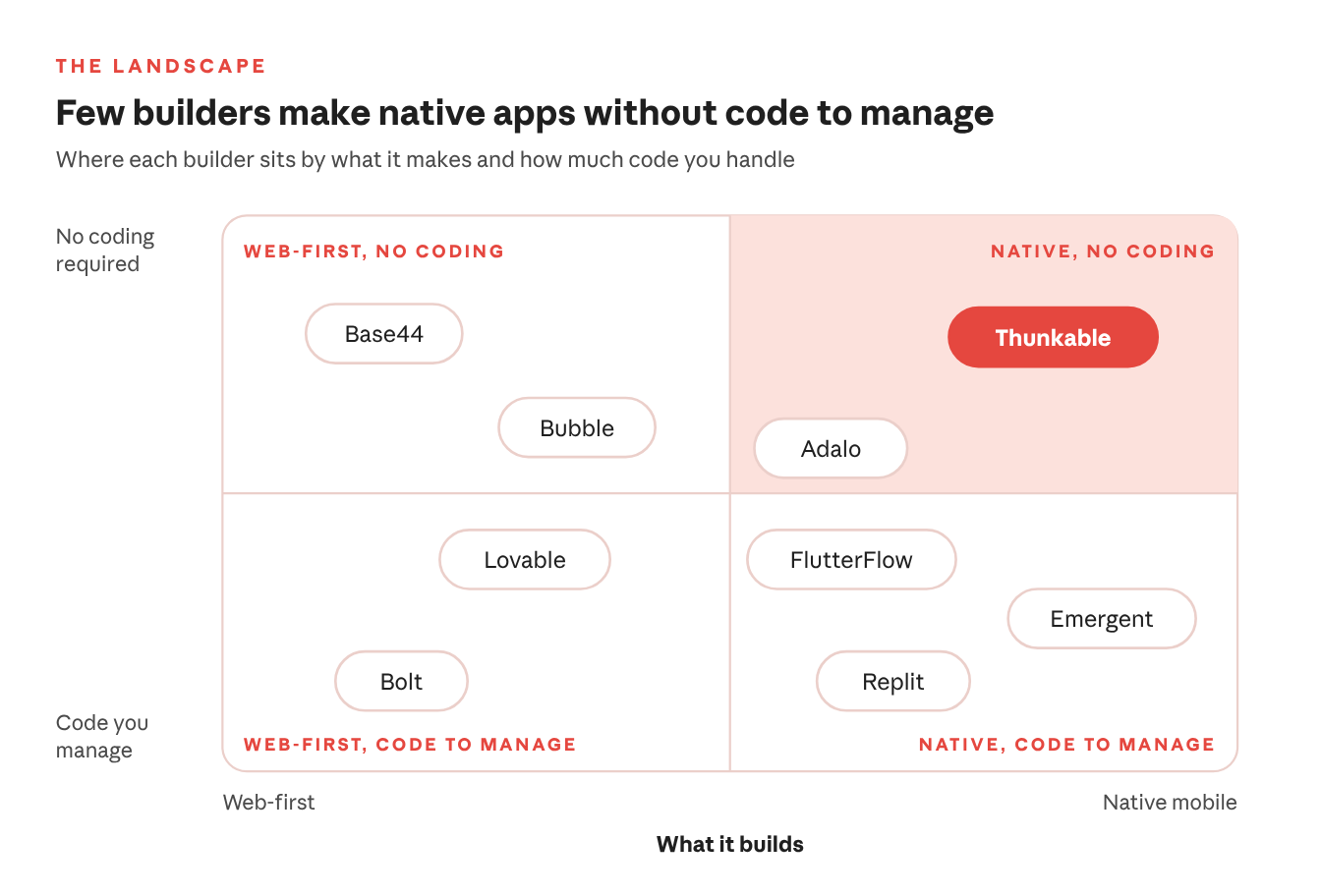
Most builders either start on the web or hand you code to manage. Thunkable makes native apps without either, and pairs AI building with a visual editor and direct code editing in one place. Adalo is the nearest no-code option, but after the first AI draft you assemble it by hand, with no access to the code. FlutterFlow sits close too, but expects you to learn its framework.
The short version
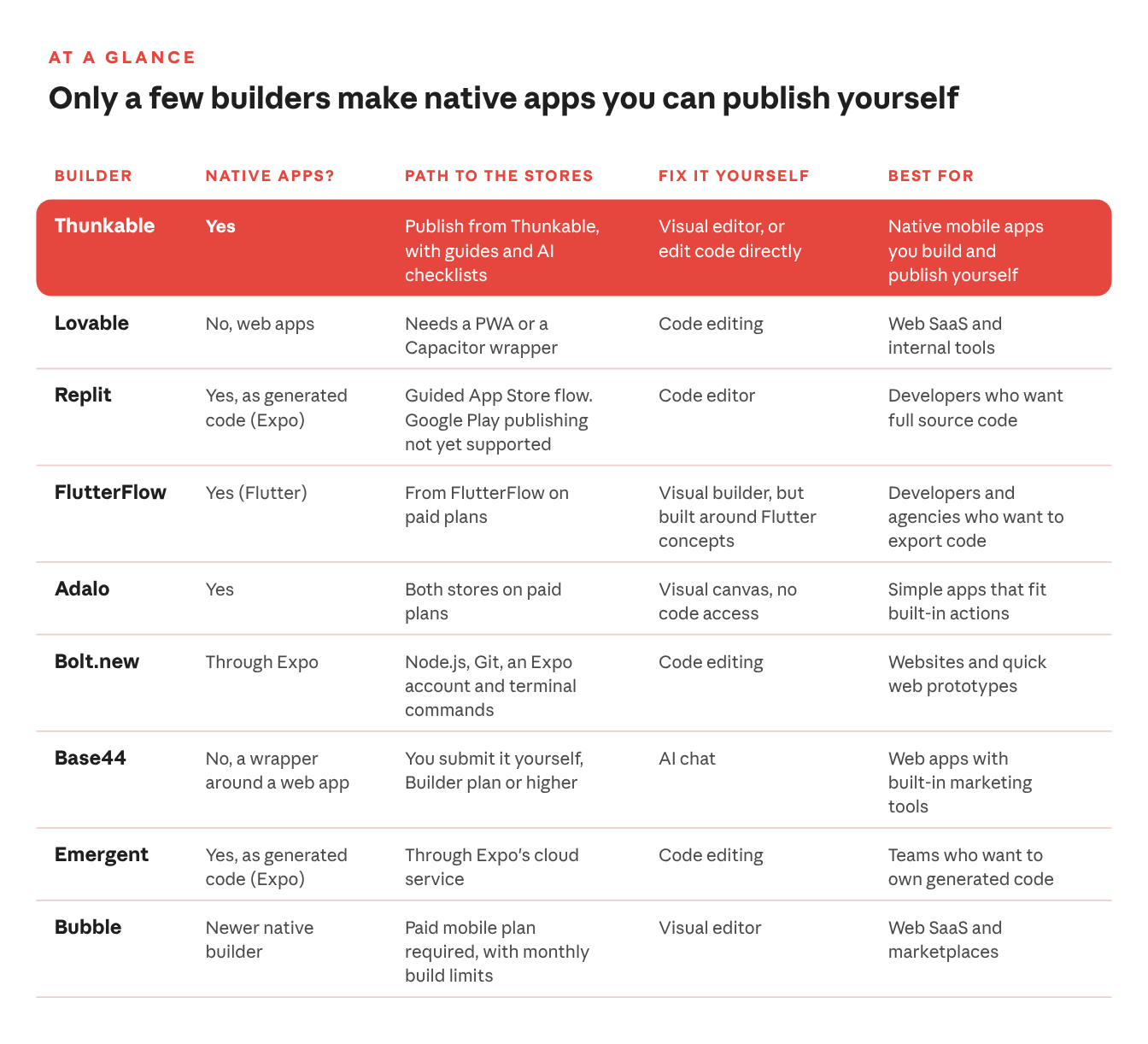
Only a few of these builders make a native mobile app and help you publish it without technical steps. Here's how all eight compare.
Where Thunkable stands out
Thunkable was built mobile-first, and that shows up in five places.
- Native from the first prompt. Every project is a native iOS and Android app, with 25+ native device features, including camera, barcode scanning, GPS and maps, push notifications, biometrics, NFC and Bluetooth. In-app purchases, subscriptions and ads are built in.
- AI plus control. Build entirely with AI, edit code directly, or use a hybrid approach. Discuss Mode helps you plan changes and troubleshoot, and the visual editor lets you fix things yourself.
- A real path to the stores. Publish to the App Store, Google Play and the web in a few clicks, with publishing guides and AI checklists along the way.
- More than store apps. Founders launch MVPs to test with real users, product teams validate mobile ideas, and operations teams build internal mobile tools without adding to the engineering backlog. The same app can also go to the web.
- A decade of mobile experience. Founded in 2015, Thunkable has more than 6 million users in 196 countries, including teams inside Fortune 100 companies. Opendoor used it to cut a mobile build from five to six months to five to eight weeks.
"I loved how simple Thunkable made the App Store submission process," says Guy Bacci, founder of Pennant Chase.
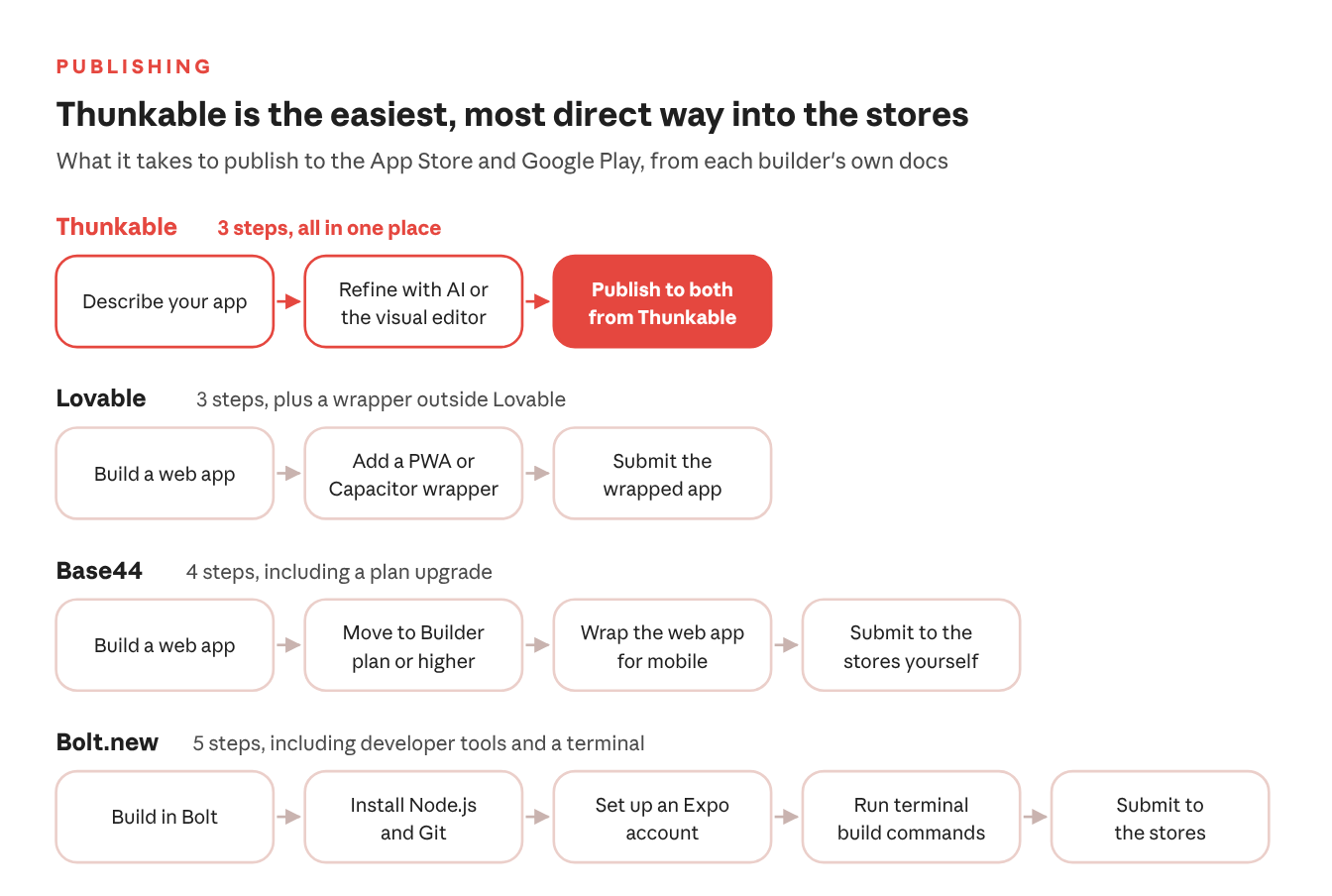
Web-first builders add steps between your app and the stores: a wrapper, a plan upgrade, or a developer toolchain. On Thunkable, publishing is part of the same tool you build in.
Thunkable vs Lovable
Lovable turns plain-language prompts into full-stack web software, with hosting, payments and login included. It has the biggest brand among vibe coders, so it's often where a first-time founder starts.
Where Lovable shines: web products. SaaS dashboards, marketing sites and internal tools that live in a browser are exactly what it's built for.
Where it falls short for mobile: Lovable's own docs say it builds web applications and doesn't generate native mobile projects. Publishing ends at a web URL. To get into the App Store or Google Play, you'd wrap your site in a PWA or a tool like Capacitor, use a third-party wrapper service, or rebuild.
Where Thunkable has the edge: Lovable is built for people who want to run a web product, with the hosting, auth and backend choices that come with it. Thunkable starts with the app people download. Describe your idea and you get a native iOS and Android app, with 25+ device features like camera, push notifications and GPS, and a built-in path to both stores.
Choose Lovable if your users will find you in a browser. Choose Thunkable if they'll mostly use your product on their phones.
Thunkable vs Replit
Replit is a developer platform with an AI agent that builds full-stack apps, including login, database and hosting. It now builds mobile apps too, as React Native code through Expo.
Where Replit shines: flexibility. Developers and technical teams get full source code, a backend they control, and web and mobile in one place.
Where it falls short for mobile: the AI writes code you own, which also means you own reading and debugging it. Replit's docs say iOS builds go through a guided TestFlight and App Store Connect flow, but "publishing to Google Play is not yet supported." Android release is on you.
Where Thunkable has the edge: Replit serves developers, learners and builders on one general platform. Thunkable is built for one job: native mobile apps. Thunkable doesn't ask you to think like a developer. Describe your app, refine it visually, and publish to both stores. If you do want to get into the code, you can edit it directly.
Choose Replit if you're a developer who wants full control of the codebase. Choose Thunkable if you want a mobile app without managing one.
Thunkable vs FlutterFlow
FlutterFlow is a visual development platform for mobile, web and desktop, with code export, team collaboration and an AI tool called Dreamflow. Of everyone on this list, it's the closest to Thunkable on mobile.
Where FlutterFlow shines: handing off to engineers. If you have developers on the team and plan to export Flutter code and extend it by hand, FlutterFlow is a solid choice.
Where it falls short for non-developers: it's low-code, not no-code. You'll work with Flutter concepts like widget trees and state management, and one FlutterFlow agency estimates non-technical founders need 40 to 100+ hours before producing a quality app. The $39/mo Basic plan includes 50 AI requests a month, and team plans are priced per seat, starting at $80 for the first seat.
Where Thunkable has the edge: Thunkable is built for creators, not developers. You start from a sentence instead of a blank canvas: Thunkable AI plans your screens, designs the layout and writes the copy. Then you keep building with AI, refine it visually, or take direct control of the code when you need it. No Dart and no framework to learn first.
Choose FlutterFlow if exporting your code is a must. Choose Thunkable if you want to build and publish a native app yourself, without learning a framework.
Thunkable vs Adalo
Adalo is a no-code builder that compiles native iOS and Android apps. Its AI builder, Ada, generates screens, a database and navigation, and its pricing has no usage or token-based charges.
Where Adalo shines: simple apps that fit its built-in actions, at a flat price.
Where it falls short: room to grow. After the first AI draft, Adalo is manual assembly: you drag each component and build each data connection, screen by screen. There's no way to edit or export the code, so when your app needs more than Adalo's built-in actions, you're limited to what the platform supports. Custom integrations and custom actions start on the Professional plan ($52/mo billed annually). Performance is the other watch-out: one certified Adalo agency puts the practical limit at about 10,000 records per collection before Android performance drops, and reviewers have reported apps slowing down as they grew, though recent reviews say speed has improved.
Where Thunkable has the edge: Thunkable keeps the AI working with you after the first draft. Ask for changes in chat, use Discuss Mode to plan and troubleshoot, adjust screens and logic in the visual editor, or edit code directly when you need more than preset actions. It also goes deeper on mobile, with 25+ native device features, including camera, GPS, push notifications, biometrics, NFC, Bluetooth and motion sensors, plus built-in in-app purchases, subscriptions and ads. An independent review of Adalo even points builders to Thunkable for Bluetooth and sensor-heavy apps.
Choose Adalo if your app is simple, will stay within its built-in actions, and a flat price matters most. Choose Thunkable if you want AI that keeps building with you, code access when you need it, and room for your app to grow.
Thunkable vs Bolt.new
Bolt creates apps and websites by chatting with AI, with a built-in backend and hosting. It's aimed at product managers, entrepreneurs, marketers, agencies and students, and it can make mobile apps through Expo.
Where Bolt shines: speed on the web. Websites and quick web prototypes are its sweet spot.
Where it falls short for mobile: Bolt's speed stops where publishing starts. To reach the stores, you install Node.js and Git, set up an Expo account, and run build commands in a terminal. Bolt's own help docs also warn that projects started for web "do not easily switch over to mobile."
Where Thunkable has the edge: for a non-technical builder, those terminal steps are often the hardest part of the project. Thunkable keeps the whole trip, from first prompt to store listing, in one place. Every project starts as a native iOS and Android app, and you publish to the App Store and Google Play from Thunkable, with publishing guides and AI checklists along the way.
Choose Bolt if you want a website fast and you're comfortable with a terminal. Choose Thunkable if you want a mobile app, for the stores or for your team, without one.
Thunkable vs Base44
Base44 builds apps, websites and AI agents from plain language, with payments and built-in marketing tools like search optimization, analytics and social content. It's popular with non-technical creators and small businesses, especially people already comfortable with Wix.
Where Base44 shines: web apps and online products that need marketing tools built in.
Where it falls short for mobile: Base44's help docs describe its mobile app as a "lightweight native wrapper around your web app." It needs the Builder plan or higher, doesn't support offline mode or HealthKit, and you handle store submission yourself.
Where Thunkable has the edge: a wrapper brings the browser's limits with it. Thunkable builds a true native iOS and Android app from the first prompt, with 25+ native device features, including camera, barcode scanning, push notifications, biometrics, NFC and Bluetooth. Then it guides you through publishing to both stores. Mobile is the product, not an export setting.
Choose Base44 if you're building for the web and want marketing tools in the box. Choose Thunkable if you want a real app, not a website in a wrapper.
Thunkable vs Emergent
Emergent uses AI agents to design, code and deploy full-stack web and mobile apps, and you own the code. It's backed by Y Combinator, holds SOC 2 and ISO 27001 certifications, and builds mobile apps with Expo, whose cloud service can submit to both stores.
Where Emergent shines: generated code you own, plus security certifications that matter to some teams on day one.
Where it falls short: predictability. Emergent is rated 2.8 out of 5 on Trustpilot across more than 650 reviews, and the most common complaint is credit use: reviewers say runs that fail still burn credits and can leave them stuck mid-build. And when the agent can't fix something, the next step is reading the code yourself.
Where Thunkable has the edge: when the AI gets close, you can finish it yourself. Open the visual editor and tweak screens and logic directly, or use Discuss Mode to troubleshoot before you ask for another change. You're never stuck waiting on another run to fix a button.
Choose Emergent if you want to own generated code and have developers to extend it. Choose Thunkable if you want to build and fix a native app yourself, without reading code.
Thunkable vs Bubble
Bubble is one of the biggest names in no-code, with AI prompting and visual editing on a full-stack platform and a large plugin ecosystem. It's the go-to for founders building web SaaS and marketplaces.
Where Bubble shines: complex web apps, and teams that rely on its plugins.
Where it falls short for mobile: Bubble's native mobile builder is newer and still maturing. There's no direct way to convert an existing Bubble web app; you rebuild the screens in the mobile editor, though you can copy some elements over and reuse your database and backend workflows. You can build on the free plan, but a paid mobile plan is required to test with TestFlight and Google Play or to publish, and plans start at $59/mo billed annually with 5 build submissions a month.
Where Thunkable has the edge: Bubble's roots are in web apps, and its mobile builder is a newer addition. Thunkable has been mobile-first for more than 10 years, since it was founded in 2015, so building for phones is the main path, not a side road. More than 6 million users in 196 countries have built with it.
Choose Bubble if you're building a web SaaS or marketplace. Choose Thunkable if your users will mostly reach you on their phones.
Where Thunkable isn't the best fit
No tool is right for every project. Thunkable is probably not your best choice if:
- You need to export source code and hand it to an engineering team. FlutterFlow, Replit and Emergent are built for that.
- Your product is web-first, like a SaaS dashboard or a marketplace that lives in a browser. Thunkable publishes to the web too, but it's designed around phones; Lovable, Bolt, Base44 and Bubble are stronger there.
- Several people need to edit the same project at once. Thunkable Organizations support shared projects with Owner, Editor and Viewer roles, but one person edits at a time.
How to choose
Start with where your users will find you, then how much code you want to touch.
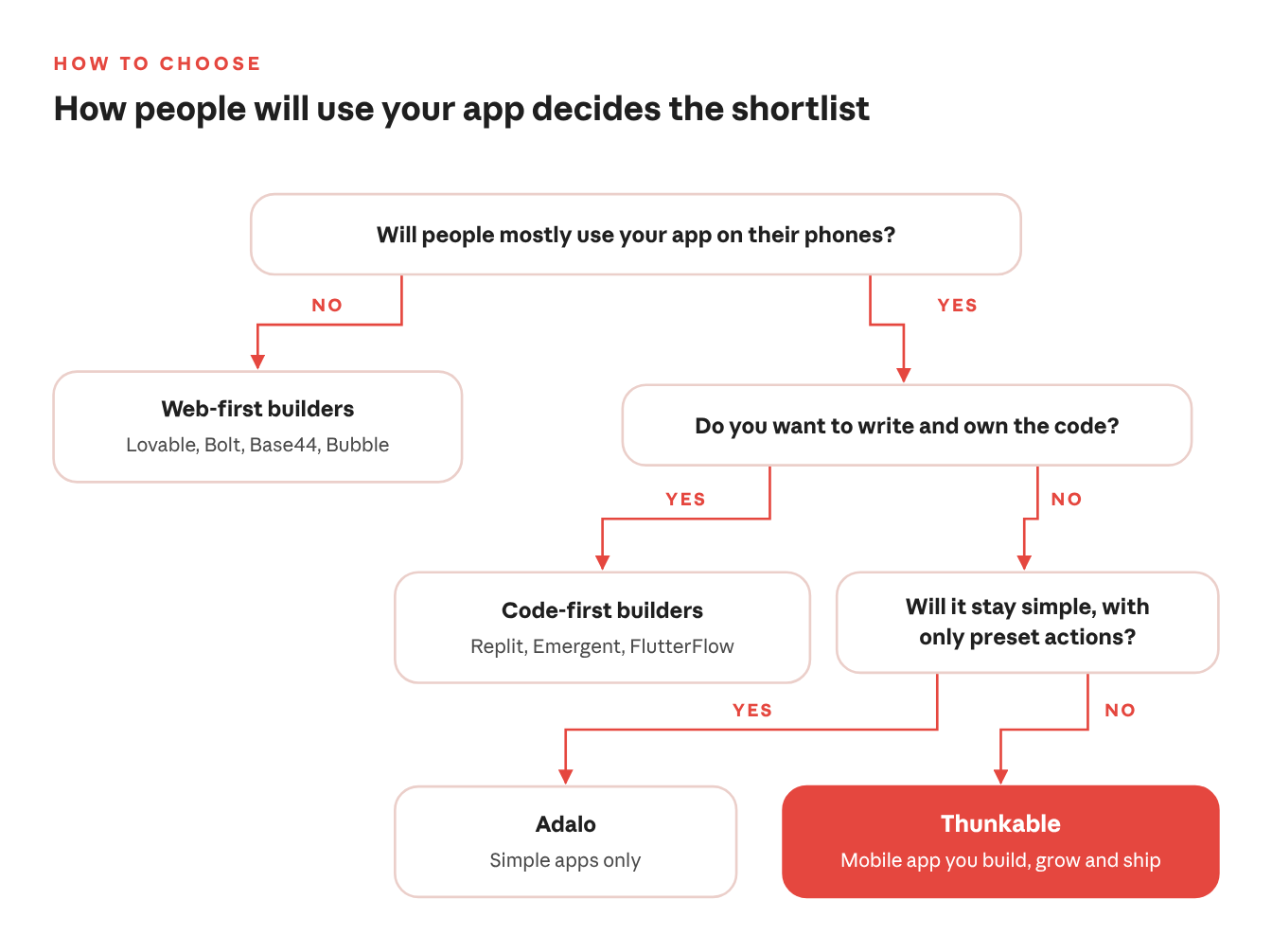
- Your product is a website or a browser-first web app: Lovable, Bolt, Base44 or Bubble will get you there fast.
- You're a developer, or you'll hand the code to one: Replit, Emergent or FlutterFlow give you a codebase to own and extend.
- You want an app built for phones, whether it's an MVP to test with real users, a tool for your team, or an app for the App Store and Google Play: start with Thunkable.
That last group is who Thunkable is built for. AI gets you started, you keep building with AI or take direct control when you need it, and you publish to the App Store, Google Play or the web from one place. As Nomad Journal founder Marco Ilagan put it: "I can publish our app both on Apple and Android. That's one thing that sold me."
FAQ
Which AI app builders make native iOS and Android apps? Thunkable, Adalo and FlutterFlow build native apps you can publish from the platform. Thunkable is the one that combines AI building, a visual editor and direct code editing without asking you to learn a framework; Adalo has no code access, and FlutterFlow is built around Flutter. Replit and Emergent generate native app code through Expo. Lovable and Base44 build web apps, and Bubble's native mobile builder is newer.
Do I need to know how to code to use Thunkable? No. Describe your app and Thunkable AI plans the screens, layout and copy. Then refine it with more prompts or the visual editor. If you want to, you can also edit code directly.
Is Thunkable free? You can generate your app for free. Publishing to the App Store and Google Play starts on the Builder plan, from $37/mo billed annually.
Can I publish to both the App Store and Google Play? Yes. Thunkable publishes to the App Store, Google Play and the web in a few clicks, with publishing guides and AI checklists to help you through review.
Build the app, not just the website
Describe your idea and get a native iOS and Android app you can test, improve and publish yourself. More than a decade of mobile expertise is behind the AI.
.png)
View Pricing
If you’re an administrator or requesting multiple licenses for your school or district, our team will follow up with you directly to learn more and help set up the right Education plan. We’ll work with you to make sure Thunkable is the best fit for your districts/classrooms.
We also offer special discounts for individual students and educators. Apply below, and you’ll receive a promo code via email to claim your discounted Thunkable Education plan.


Related Resources
Thunkable vs the top AI app builders: which one actually gets your app into the App Store?
.png)
.jpg)
True Native Apps vs. Progressive Web Apps: The Difference For Developers and Their Users

.png)
Thunkable AI Builder: What it Actually Does
Start
Creating
Creating



Your idea can be live today.